Optimizing Your Email Campaigns through A/B Testing
To perform A/B split testing to determine the best email variables to use on your email marketing campaigns.
Prefer a shortcut? 16 free tools do parts of this for you.
Aim: To perform A/B split testing to determine the best email variables to use on your email marketing campaigns.
Optimal Outcome: You will be able to determine the most effective email variables before launching your email marketing campaign. This will ensure that you will able to maximize conversion and achieve your campaign goals.
What do you need to start: You will need an email marketing tool. For the purposes of this SOP, we are going to use Mailchimp.
Why is this SOP Important: There are different variables that make up an email campaign. You must ensure that you’re using the most effective ones to maximize your results and minimize wasted resources.
When and Where to execute: This SOP will be performed within an email marketing platform. Ideally, this should be done before launching an email campaign.
Who Should Be Doing This: The marketing manager
What is A/B testing?
In a nutshell, A/B testing (also referred to as split testing) is a process that allows you to determine the most effective email variables that you should use in your email marketing campaign. This is done by sending out two versions of an email (with differing variables) to two small groups from your email list and checking how the recipients respond to each of them. This way, you’ll be able to determine the better version to send out for your actual campaign.
Execution
Resources/Tools & Set up
- You will need access to an email marketing platform. For the purposes of this SOP, we are going to use Mailchimp.
Setting up Your A/B Test Campaign
-
Log into your Mailchimp account.
-
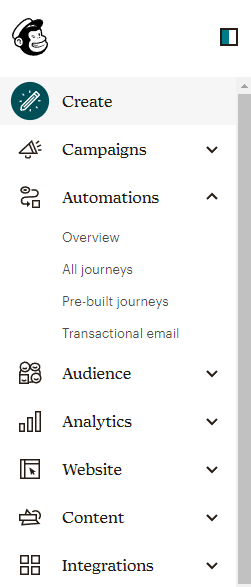
Click on Create. You’ll find it on the menu, on the left-hand panel of the main dashboard.
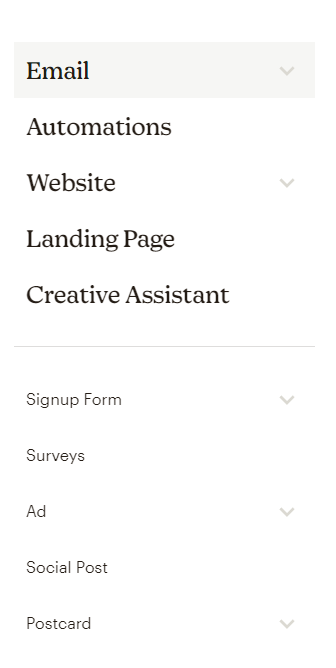
- This will open a new page and a new menu. Then, click on Email.
-
This will reveal a dropdown menu. Choose A/B test.
-
You will then be asked to determine the audience that will receive your test campaign. Select Segment or tag. Then, select the segment you prefer.
Optional: Creating a New Segment
But what if you don’t have any segments prepared? Here’s how to create a new segment:
-
Return to your Mailchimp dashboard.
-
From the main menu, click on Audience.
-
Then, click on Segments from the dropdown menu revealed.
-
If you have multiple audiences (or email lists), you may click on Current audience to choose the one you wish to launch this test and campaign for.
-
Then, click on Create Segment.
-
Configure your segmentation criteria.
-
Once done, click on Preview Segment.
-
Check if there are any errors. If there are, then click on Edit to make the necessary changes. If everything looks okay, then click on Save as segment.
-
A pop-up window will appear. It will allow you to name and save your segment.
-
Enter the name you wish to use, then click on Save.
Determining the Variables to be Tested
-
Now that you have chosen the test segments, it’s time to determine the variables that you want to test. MailChimp presents four different variables that you can try. These are Subject line, From name, Content, and send time.
-
Mailchimp allows up to three variations for testing. However, for the purposes of this SOP, we are going to test two variations at a time. You may click on the - and + icons to set your preferred number of variations.
-
You will then be asked to determine the percentage of subscribers who are going to receive your test campaign.
Note: We recommend following an 80:20 ratio. Where you will use 20% of your email list to send a test campaign and 80% of your list to send your actual, optimized campaign. Divide this 20% further in half. The first group (or the A segment) will receive one version of your email, while the second group (or the B segment) will receive the alternative version.
- Once done, Mailchimp will then ask you how you want to determine the winning variation. There are four metrics to choose from: open rate, click rate, revenue, and manual selection.
Note: If you’re going to test the variables Subject line, From name, or Send time, then we recommend opting for Open rate. If you’re going to test Content, then we recommend Click rate or Total revenue. Finally, if you don’t want to decide on the determinant just yet, then opt for Manual selection.
- Next, determine how long you want to run your test.
Crafting and Sending Out Your Test Email Campaign
-
You will find that Mailchimp will provide you with two separate fields to enter your differing versions based on the variables you want to test. For the purposes of this SOP, we are going to test two different subject lines.
-
You should then determine how you want to track your email’s performance.
-
Once done, you may now start crafting your email. The next step is choosing the
template you wish to use. Then, click Next.
-
This will open the Design window. Compose your email.
-
Then, click on Confirm before sending.
-
Then, click Next. This will open a new window that features a pre-delivery checklist. Make sure that everything is in order.
-
From there, you’ll have two options. You can either click on Send to send out your test email campaign immediately, or you may click on Schedule to send it at a later, predetermined time.
Choosing the Winning Version
-
Once you’re ready to determine the winning version of your email, you may click on Analytics from the main dashboard from the menu at the left-hand panel.
-
Then, click on Reports.
-
Locate the test campaign you have sent out, then click on View report.
-
Select the winning version then click on Send to Remaining Recipients to send it to the remaining people on your email list.
Conclusion
You’re done! Remember, there are different elements that make up a successful email campaign. The challenge lies in determining the best variables to use to optimize your emails for success. This can be done through A/B testing.
-
To begin, choose the email marketing tool that you want to work with. For the purposes of this SOP, we have chosen Mailchimp.
-
Select the option to create an A/B test campaign.
-
Select the audience segment that you want to send it to.
-
Determine the variable and number of variations you wish to check.
-
Set the metric that will determine the better variant.
-
Craft the two email versions that you want to send out.
-
Send out your test campaign.
-
Wait for the results to come in.
-
Check the results of your test campaign.
-
Choose the winning version of your email and launch your actual campaign.