A Guide to Monthly Email List Cleaning and Management
To walk you through setting up your standard process in cleaning your email list.
Prefer a shortcut? 16 free tools do parts of this for you.

Aim: To walk you through setting up your standard process in cleaning your email list.
Optimal Outcome: To have a recurring process for cleaning up and maintaining your email list.
What do you need to start: You’ll need any one of the following:
-
CRM (Example: Salesforce)
-
Marketing automation platform (Example: Hubspot, Klaviyo, Marketo)
-
Email Service Provider (ESP) (Example: Mailchimp, ConstantContact, Campaign Monitor)
Note: In this SOP, we’ll be using Klaviyo as examples on the screenshot.
Why is this SOP Important: Maintaining a clean email list can lead to increased deliverability, improved open and click-through rates, cost savings, better data accuracy, and an improved sender reputation.
When and Where to execute: It is recommended to monitor and revisit your email list monthly.
Who Should Be Doing This: Marketing staff, person responsible for setting up email automation.
What is a clean email list?
A clean email list refers to a list of email addresses that is accurate, up-to-date, and engaged. This means the email addresses on the list are valid and active, and the subscribers have given explicit permission to receive emails from you. A clean email list also means that you have removed any email addresses that bounce, generate spam complaints, or have not engaged with your emails in a long time. Maintaining a clean email list is important for improving email deliverability, engagement, and overall email marketing success.
Execution
Pre-requisites
- Establish your email acquisition method
Collect Customer-first data - this is the information that you source directly from the customer such as from sign up forms, during account creation, during check out, and surveys. This method ensures that you have their consent to send them an email.
Use double opt-in - this method lets the subscriber confirm whether they want to be added to the list after they fill out a sign up form.
Best Practices:
-
Offer a newsletter that contains relevant information in exchange for contact information.
-
Promote exclusive perks to email subscribers
-
Implement a sign up form with no associated discounts
-
Analyze your engagement rates
Monitor the performance of your ongoing campaigns.
If you’re using Klaviyo, you can click Campaign and then click Trends.
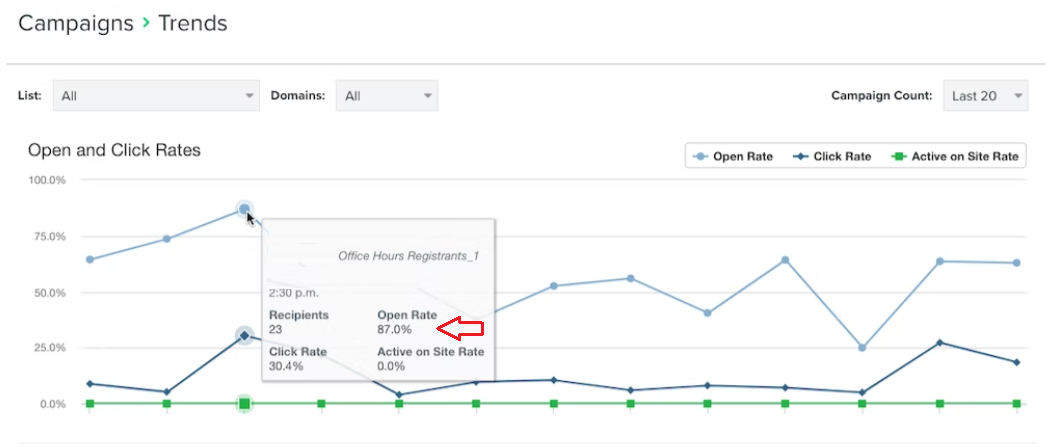
What to look for in these trends:
-
Decline in engagement metrics such as open and click rates.
-
Increase in bounce rates
-
Increase in unsubscribe rates and spam complaints
Clean and manage your email list
Suppress invalid and outdated email addresses.
-
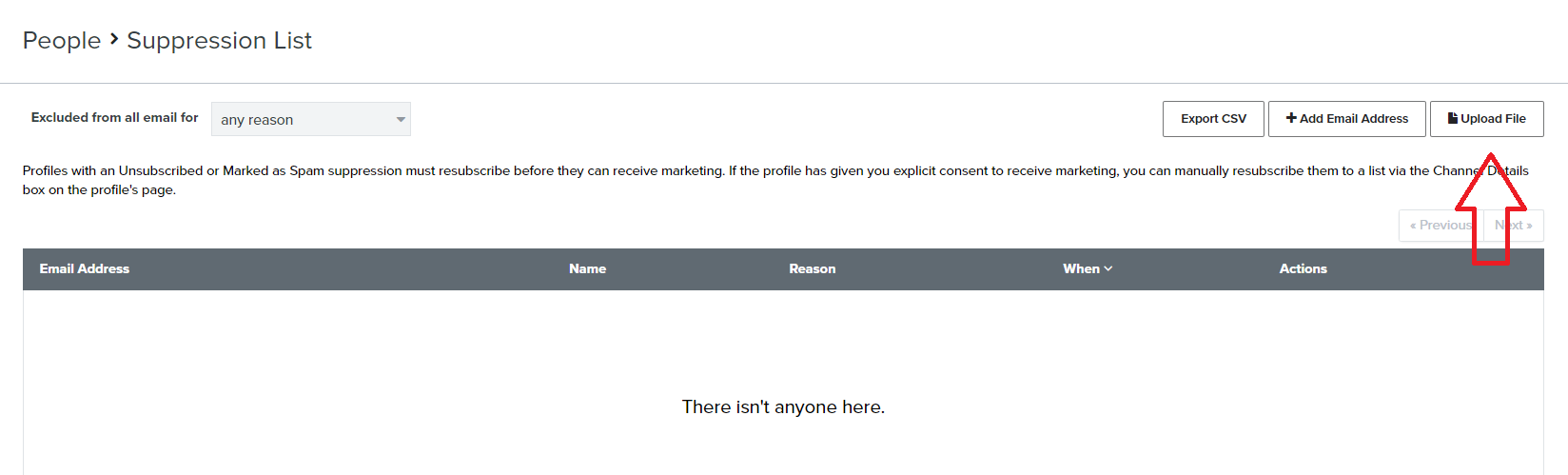
Create a list of email addresses that you want to suppress.
-
Export your list to a CSV file.
-
Remove all the columns from your file except for the one with the header Email.
-
Navigate to the left menu, click Profiles under the Audience section.
-
Click Suppressed Profiles.
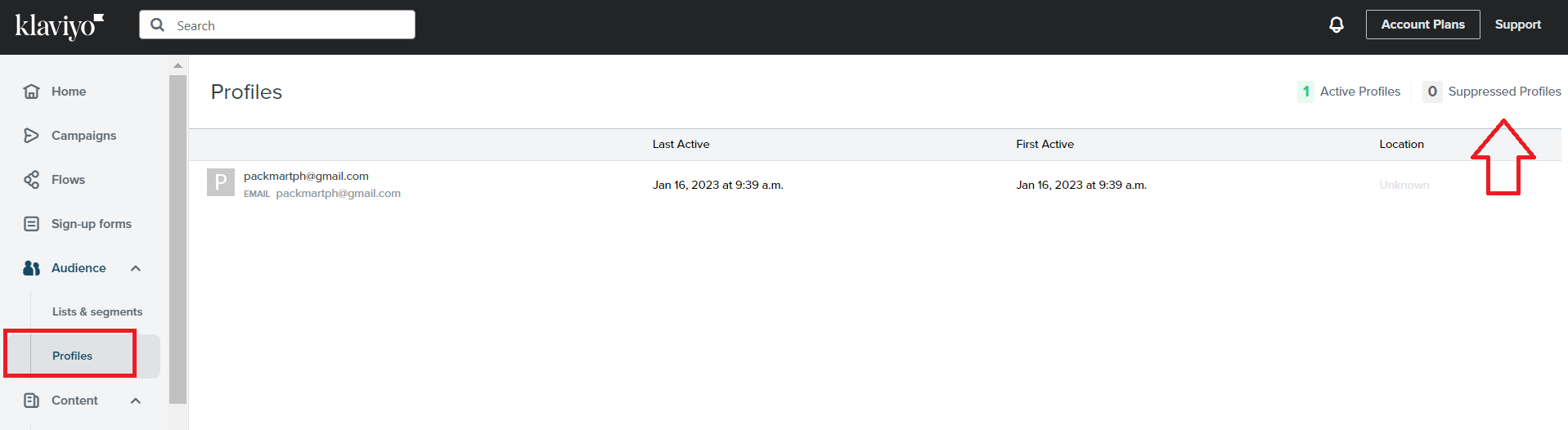
- Click Upload File.
Identify unengaged profiles in your email list
-
Define the baseline before a person can be considered unengaged.
-
Using your baseline, create segments for your unengaged subscribers.
-
Navigate to the left menu, click Lists & Segments, then click Create List / Segment.
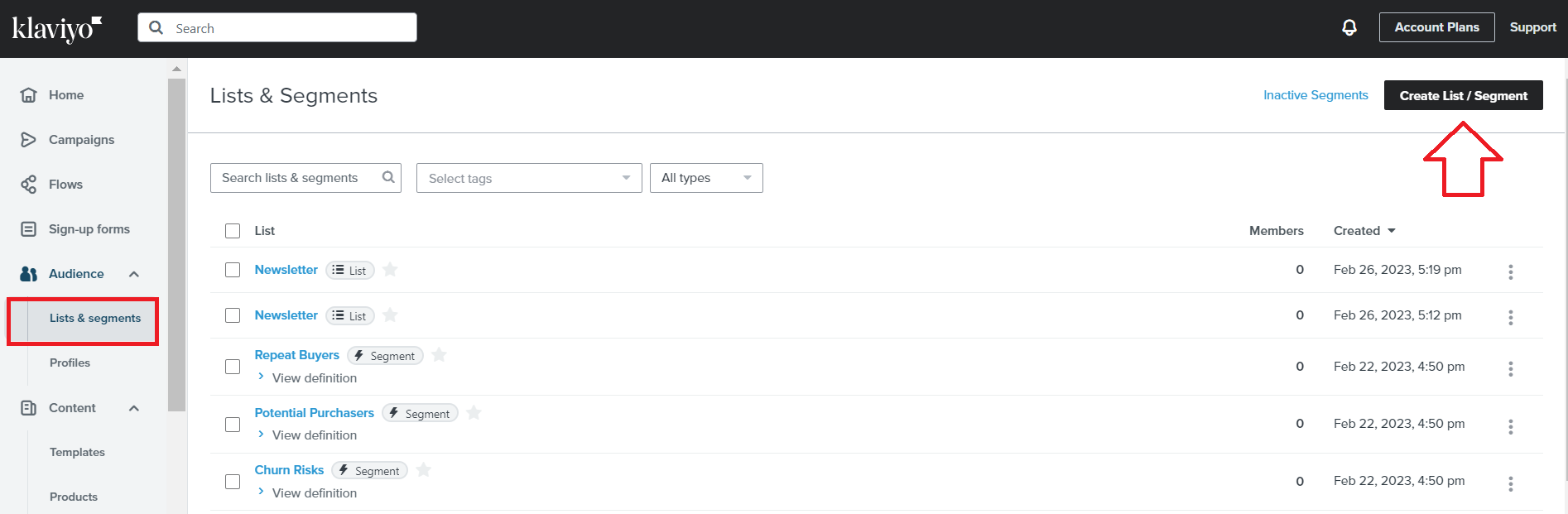
- Click Segment.
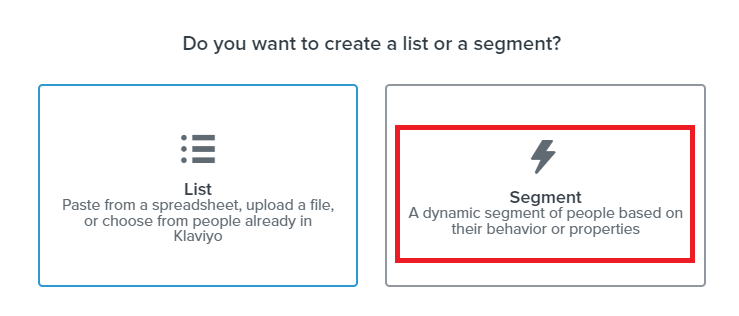
- Create segments based on your baseline. Use these segments to upload to a suppressed list, create a re-engagement, or sunset flow.
Examples:
-
Never active
-
Unengaged, never purchased
-
Unengaged, purchase
Try re-engagement email campaigns
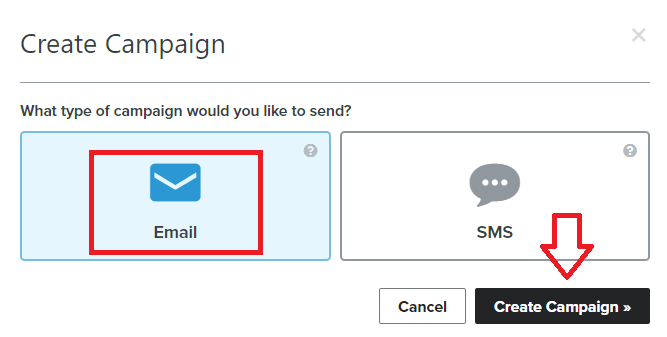
- Create a re-engagement campaign. From the left menu, click Create Campaign.

- Select the Email card, then click Create Campaign.
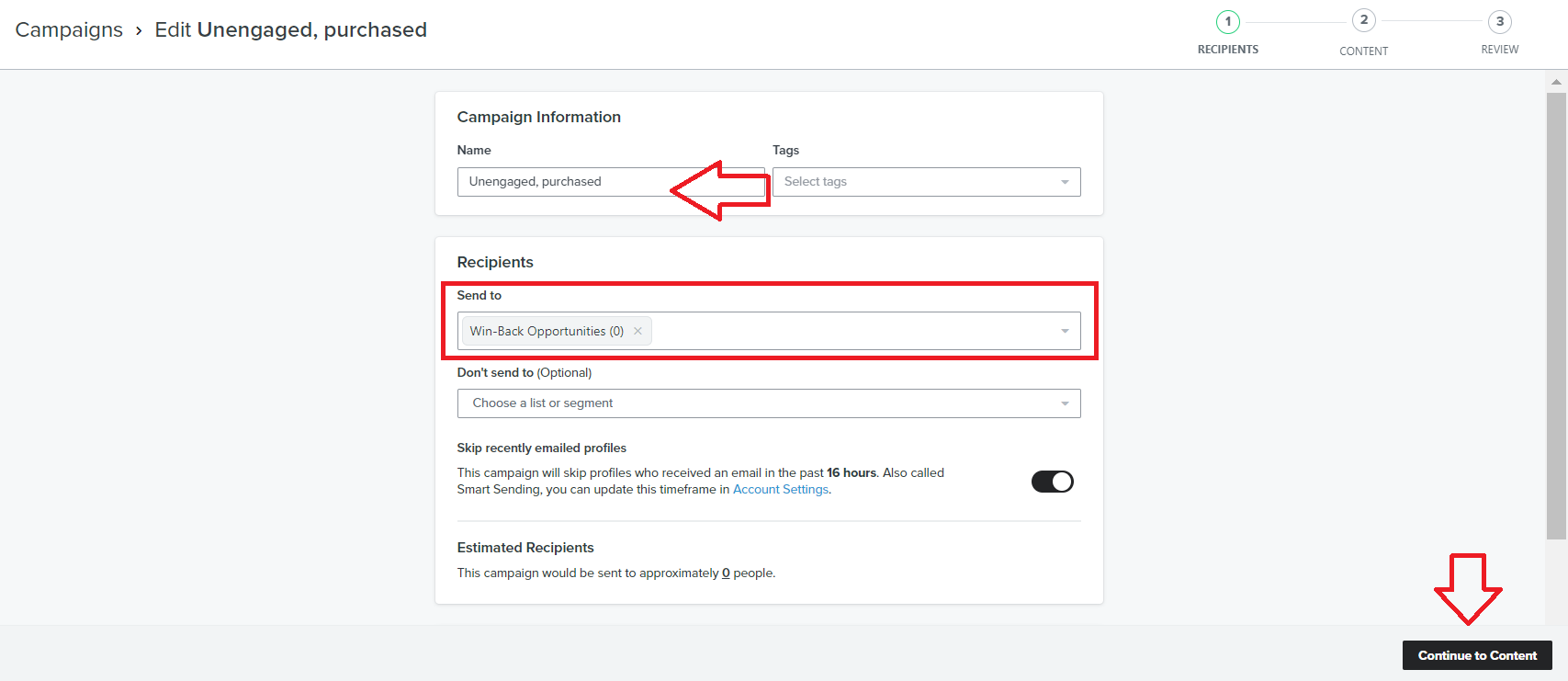
- Configure your campaign and select the unengaged segment you created.
- Another option is to set up a win-back flow. Follow this guide SOP 205: How to Set a Working Winback Flow on Klaviyo.
Create a sunset flow
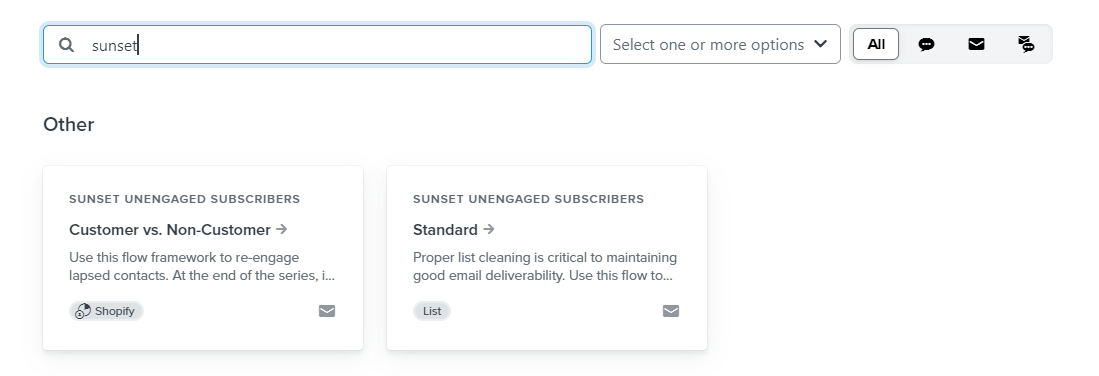
- Click Flows, then click Browse Ideas.
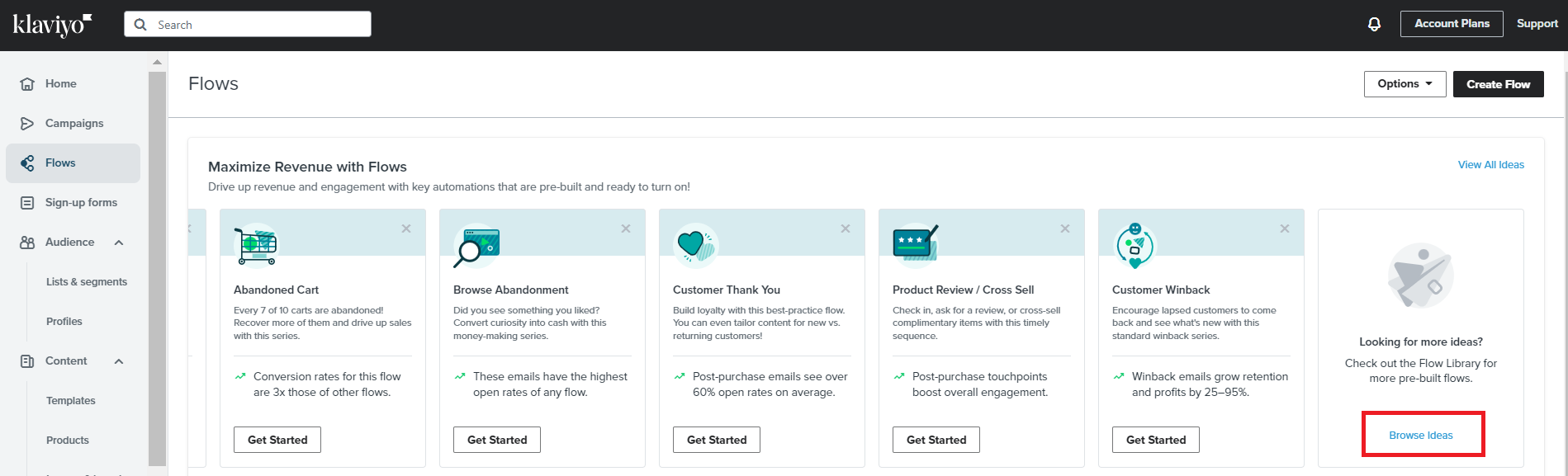
- Search for ‘sunset’ then click Sunset Unengaged subscribers - Standard.
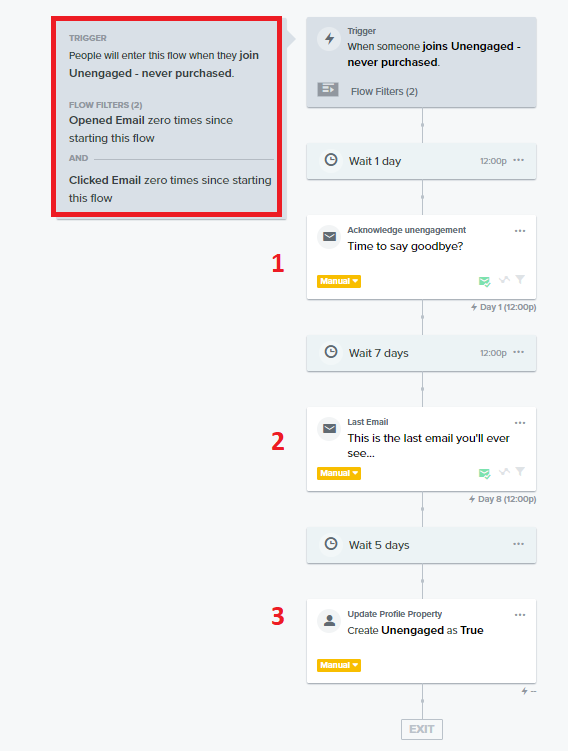
- Make sure that the trigger is configured based on the segment for the unengaged list.
Maintain your Email List
-
Prioritize engaged subscribers when sending emails. Reserve your top-tier marketing campaigns, such as sitewide sales or influencer collaborations, exclusively for your entire subscriber base. Meanwhile, keep your highly engaged subscribers informed with regular brand updates to maintain their interest and loyalty.
-
Create additional segments. Follow this guide for segment your customers based on engagement SOP 226: How to Effectively Segment your Email Campaigns to: Engaged (30d, 60d, 120d).
-
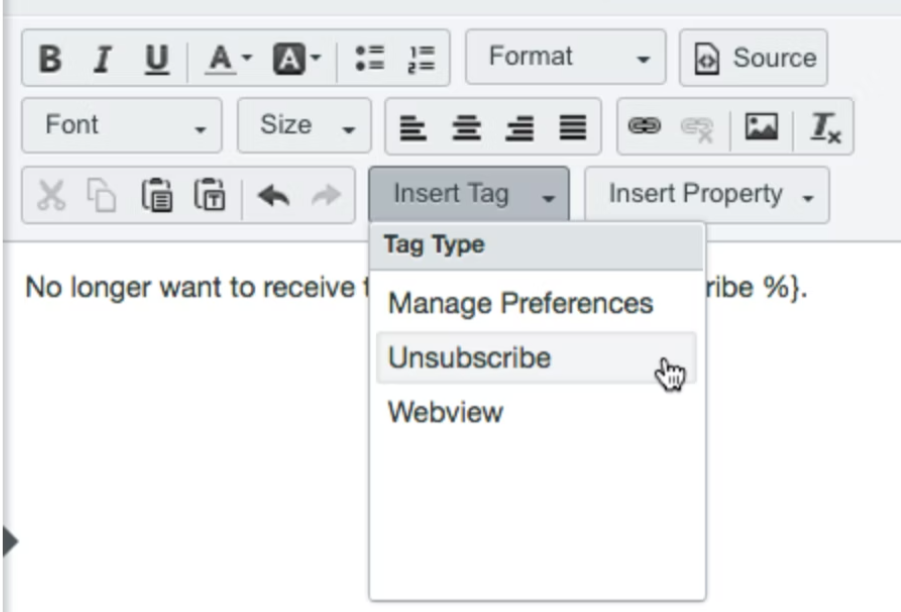
Make it easy to unsubscribe. Most templates already have the unsubscribe link built-in. You can also insert the unsubscribe tag when editing manually.
Conclusion
-
When you have an email clean list, you are more likely to have your emails delivered to your subscribers’ inboxes, rather than getting caught in spam filters or bounced back.
-
Regularly cleaning your email list and removing inactive or unengaged subscribers, you can improve your open and click-through rates.
-
Many email marketing platforms charge based on the number of subscribers on your list. By removing inactive or unengaged subscribers, you can potentially save money on your email marketing costs.
-
A clean list also means more accurate data, as you’ll have a better understanding of who is actively engaging with your content and who is not. This can help you make more informed decisions about your email marketing strategy and improve your overall results.
-
When you regularly clean your email list and only send emails to engaged subscribers, you are less likely to be flagged as spam by ISPs. This can help improve your sender reputation, which in turn can increase your deliverability rates.