A Guide to A/B Testing Subject Lines
To provide you with a step-by-step guide on how to do A/B testing for email subject lines
Prefer a shortcut? 16 free tools do parts of this for you.

Aim: To provide you with a step-by-step guide on how to do A/B testing for email subject lines
Optimal Outcome: To optimize your email campaign by setting up A/B testing for the subject lines of your emails.
What do you need to start: Marketing Automation platform
Why is this SOP Important: A/B testing for subject lines in email marketing campaigns can lead to improved open rates, engagement, insights into audience preferences, more effective segmentation, and increased ROI.
When and Where to execute: You can set your A/B testing in your Marketing Automation Platform. You should set up A/B testing when launching a new campaign, seeking to improve open or click-through rates, or making significant changes to the email strategy.
Who Should Be Doing This: Marketing staff, person responsible for setting up automation
What is A/B Testing in email campaigns?
A/B testing in email campaigns refers to the period in which an A/B test is conducted to compare two versions of an email and determine which one performs better. The duration of an A/B test depends on factors such as the size of the email list, the level of statistical significance desired, and the specific variable being tested. During this time, the two versions of the email are sent to random subsets of the email list, and their performance is measured to identify the better-performing version. The length of an A/B test schedule should be long enough to ensure statistically significant results and avoid overwhelming subscribers with too many emails during the testing period.
Execution
Resources/Tools & Set up
-
Create your email campaign flow. Here are some of the example SOPs to get you started:
-
SOP 229: Creating a Successful Browse Abandonment Flow on Klaviyo
-
SOP 230: Optimizing Customer Retention with a First-Time Post-Purchase Flow on Klaviyo
-
SOP 232: Regaining Lost Customers with a Win-Back Flow on Klaviyo
Setting up A/B testing subject lines
-
First, decide what aspect of the subject line to test. Here are some ideas on what to test in your subject lines to drive improvement on your metrics.
-
Length - most marketing guides and studies say that subject lines should be 9 words at most and no more than 60 characters. Run A/B tests to figure out the subject line length works for your campaign.
-
Word order - The placement of words in an email subject line can affect how it's perceived and read, which may influence the email open rate.
Example:
-
Use this code to get 10% off your next purchase
-
Get 10% off your next purchase using this code
Placing the benefit of opening the email (getting 10% off the next purchase) at the beginning of the subject line in the second variation can emphasize the benefit readers will receive and potentially increase open rates, as English-speaking subscribers read left to right.
When creating subject lines for your email campaigns, consider experimenting with the order of the words to evaluate if emphasizing the benefit at the beginning can enhance your open rates.
-
Content - When an email comprises multiple content pieces, such as a newsletter, testing various content pieces as subject lines can be an effective method to boost email open rates and determine which content type resonates with your subscribers. Consider experimenting with various content pieces as subject lines for your email newsletter to enhance the open rates of your campaign.
-
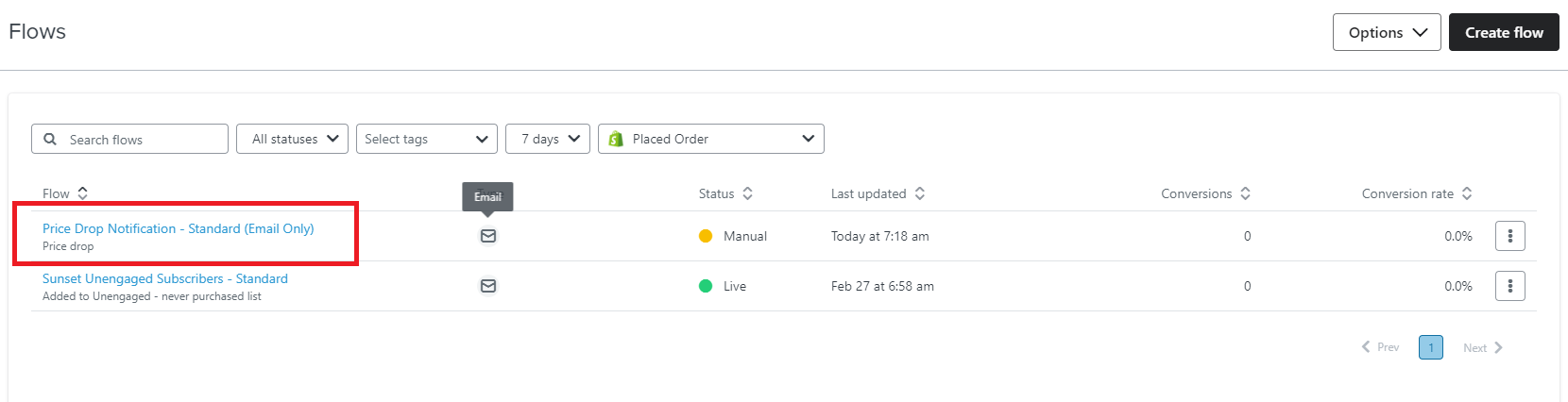
Click the flow you want to run the test for.
-
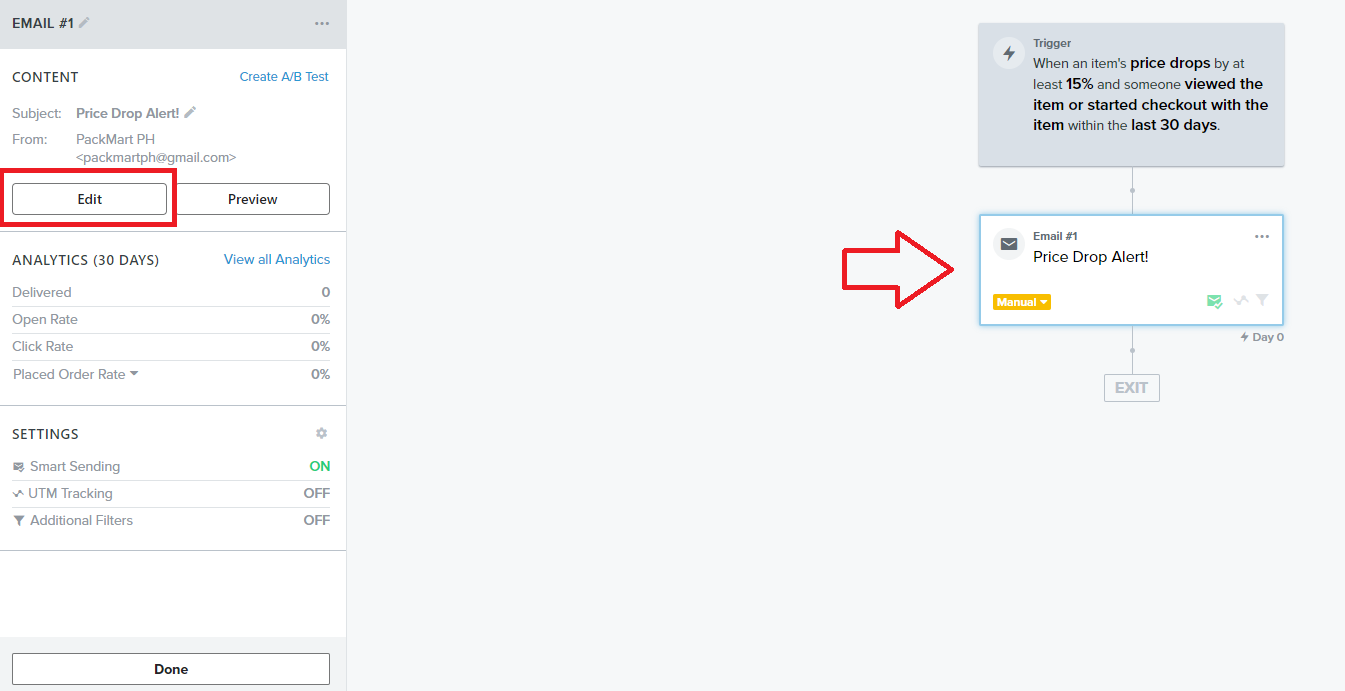
Click the email card, then navigate to the left menu and click Edit.
-
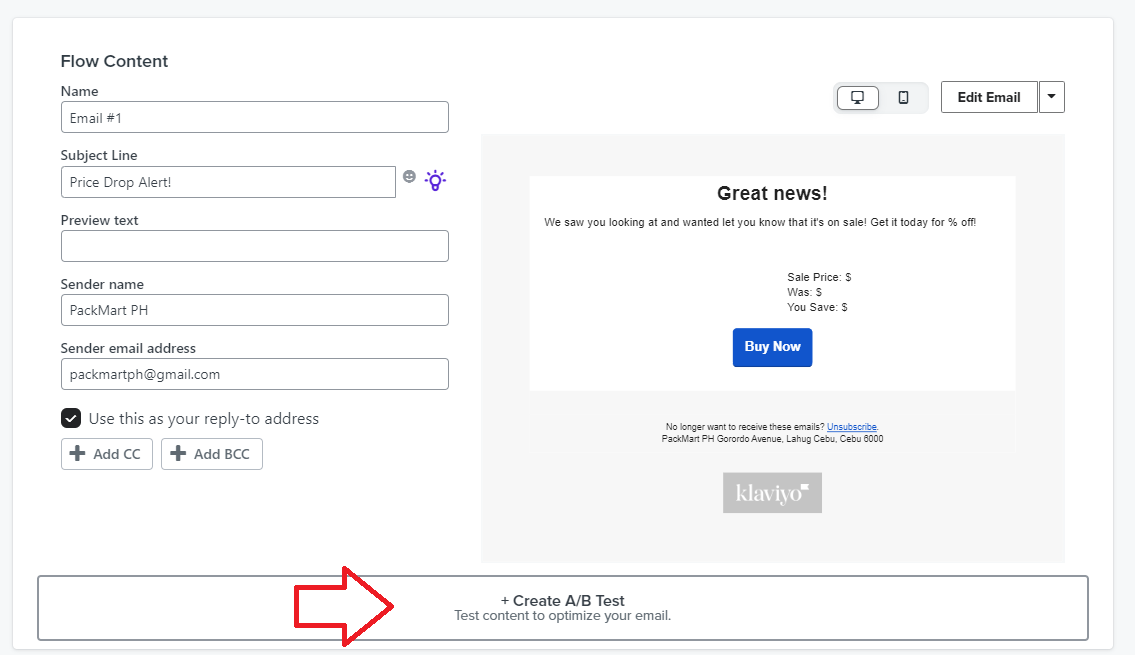
Click +Create A/B test at the bottom of the page.
-
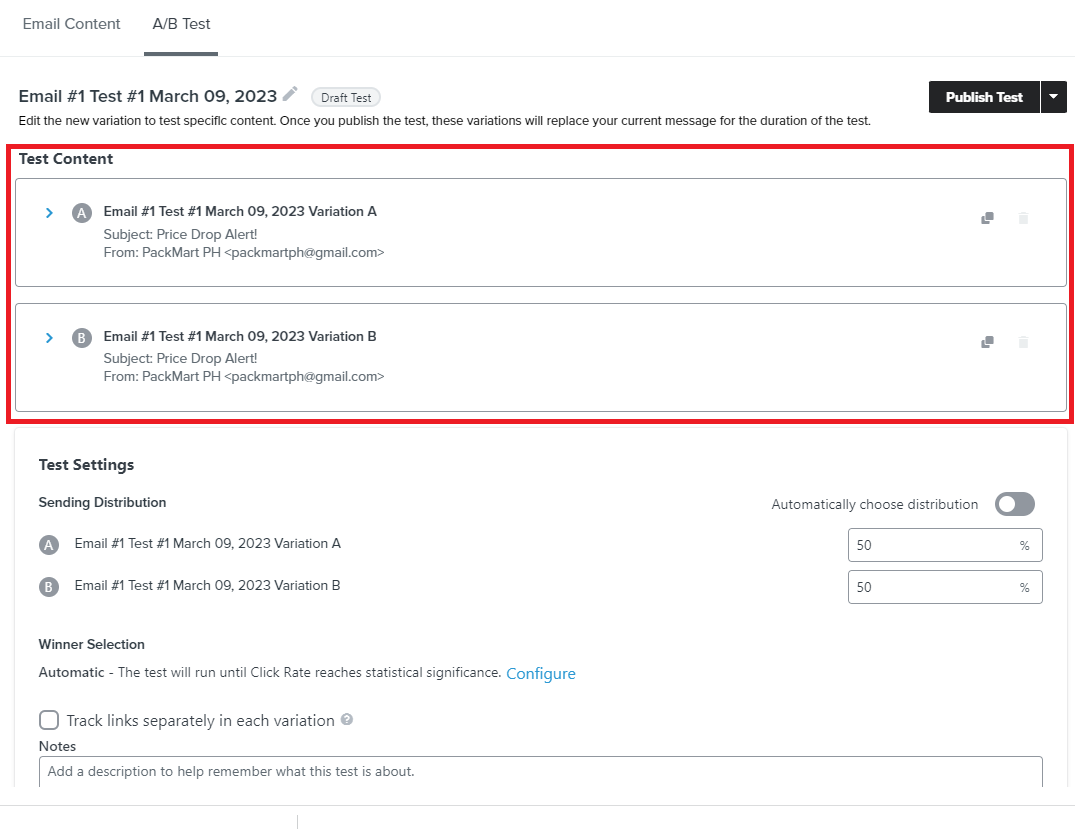
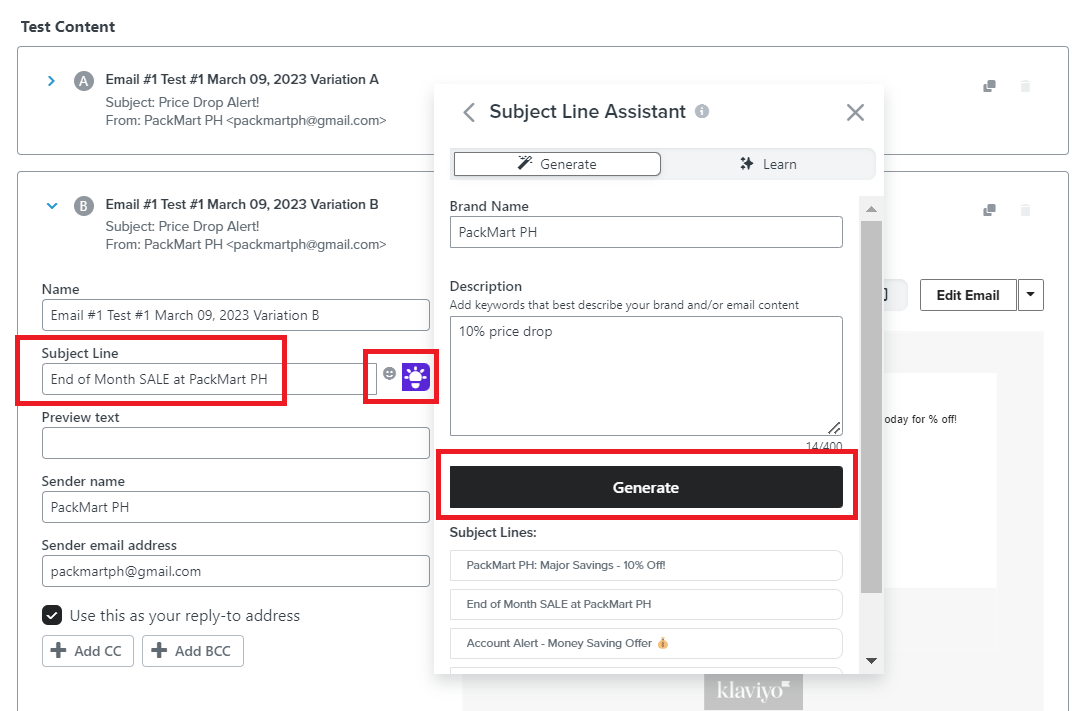
Create your test variations. Remember to keep your original subject line as your control group and add your variation.
-
You can use the Subject Line Assistant to give you some ideas on subject line variation. Click the light bulb icon next to the Subject Line field and fill out the brand name and description in the pop up box. Then click Generate to get several suggestions.
-
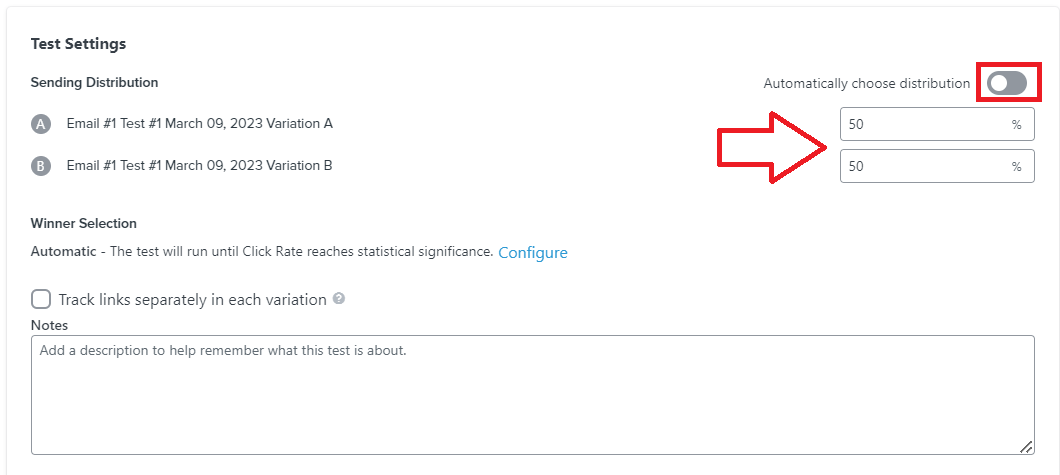
Next, decide the sending distribution percentage. You can also toggle the Automatic distribution option.
-
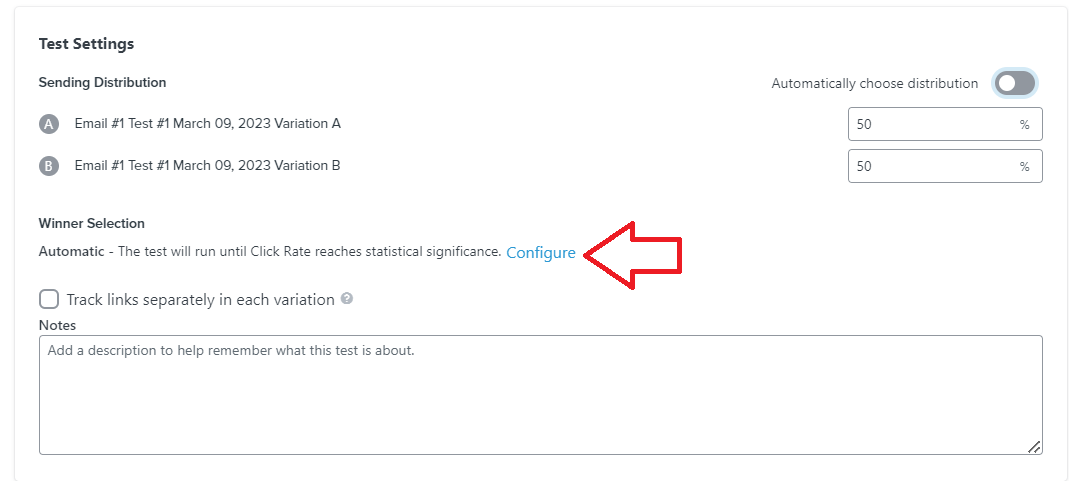
Click Configure to select options for selecting a winner for your A/B test.
-
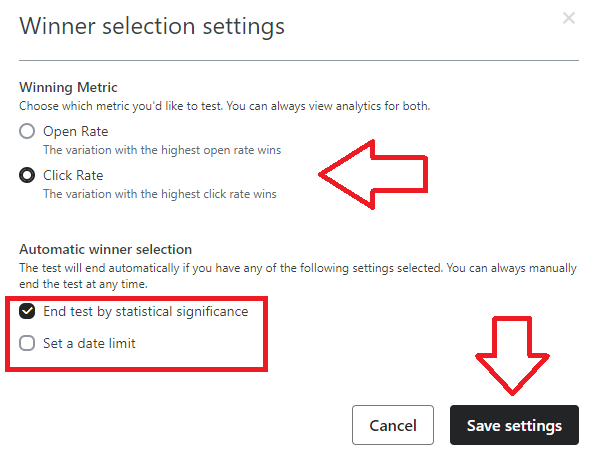
Select the metric that you want to use to decide which is the winning variation of your test. Next, select when you want to end the A/B test. Once done, click Save settings.
-
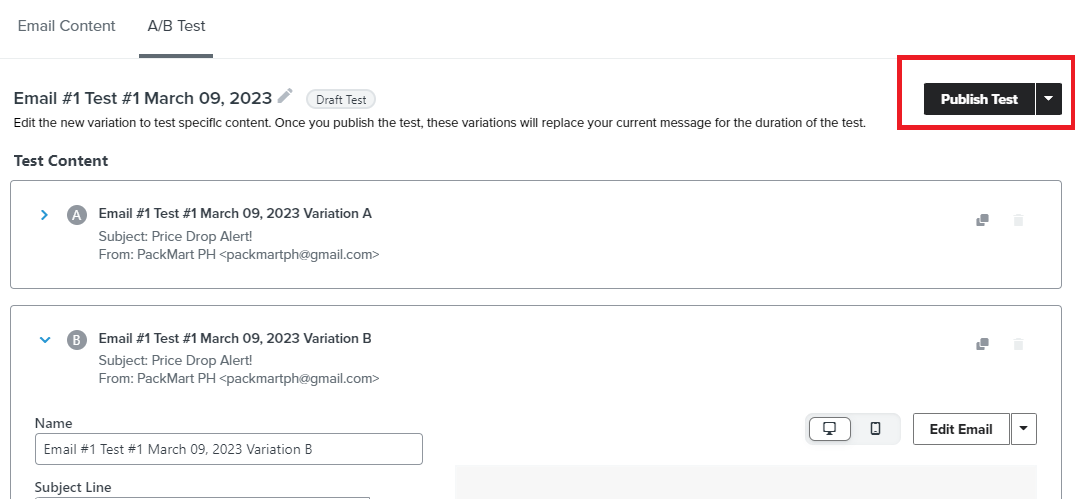
Once you’ve completed your configuration, click Publish Test.
-
Monitor and review your A/B test results on a regular basis.
Understanding A/B test metrics
Before setting up your A/B tests, you have to define what you’re trying to improve about your email campaign. Choose the metric that you will use to select the ‘winner’ of your test.
Here are some examples of metrics you want to look out for:
-
Open rate → The variation with the highest open rate wins
-
Click rate → The variation with the highest click rate wins
-
Placed order rate → The variation with the highest placed order rate wins
-
Come up with your hypothesis to determine which times to test. It would help if you already have an initial data set that can give you a baseline to test with.
-
Begin by identifying the problem or opportunity you are trying to address through A/B testing. For example, if you are trying to increase the click-through rate (CTR) of your email campaigns, your problem could be that your current email subject lines are not engaging enough or maybe the timing of your email is when customers are not checking their personal emails, etc.
-
Define the specific goal you want to achieve through A/B testing. In the example above, your goal could be to increase the CTR of your email campaigns by 10%.
-
Based on your problem and goal, formulate your hypothesis. A hypothesis is a statement that describes the expected outcome of your A/B test. For example, your hypothesis could be: “If we change the email subject line to be more engaging, then the CTR of our email campaigns will increase by 10%” or “If we send our email campaigns every Tuesday at 6PM, then the CTR of our email campaigns will increase by 10%”.
-
Create your two (up to four) variations (test group) of your email campaign. Make sure to include the original or baseline parameter which will serve as your control group.
Reviewing and interpreting results
-
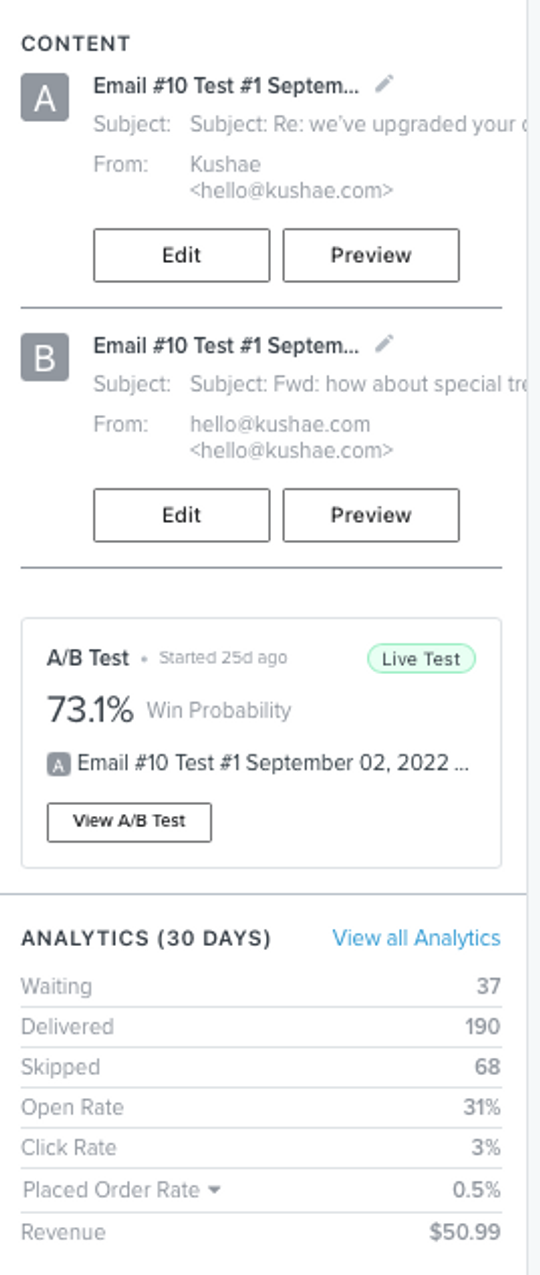
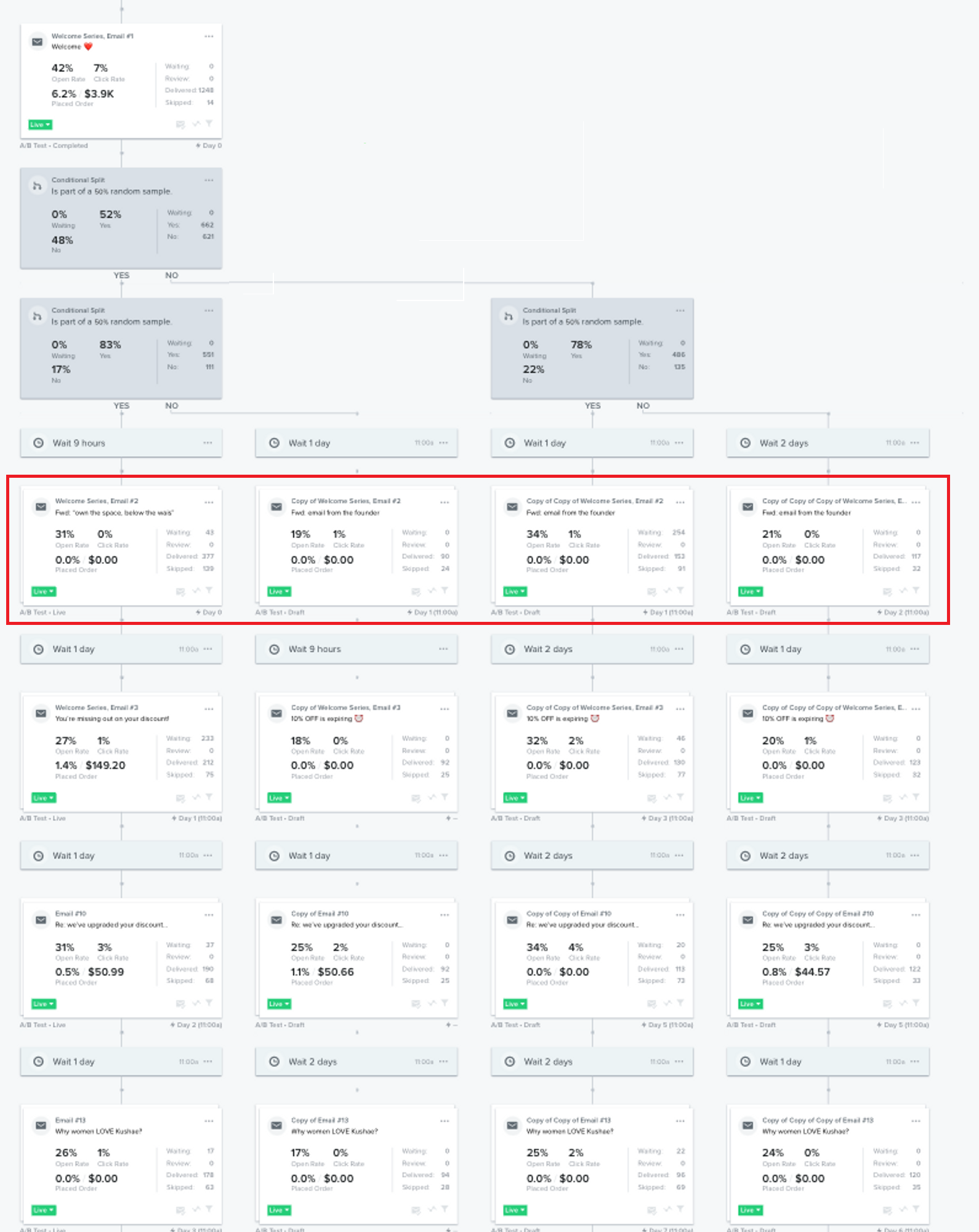
To view and analyze the results of your A/B test, navigate to the top of the page and click Show Analytics.
-
Below is an example of what the results of your A/B testing should look like.

-
Next, interpret the data from your A/B testing results. To do this, you need the following considerations:
-
Review the goal of the A/B test. What metric were you trying to improve? Were you targeting to increase open rates, click-through rates, conversions, or some other metric?
-
Compare the results of your control group (your original version) and the variations you created. Were there differences in the results? Which version showed the most improved numbers?
-
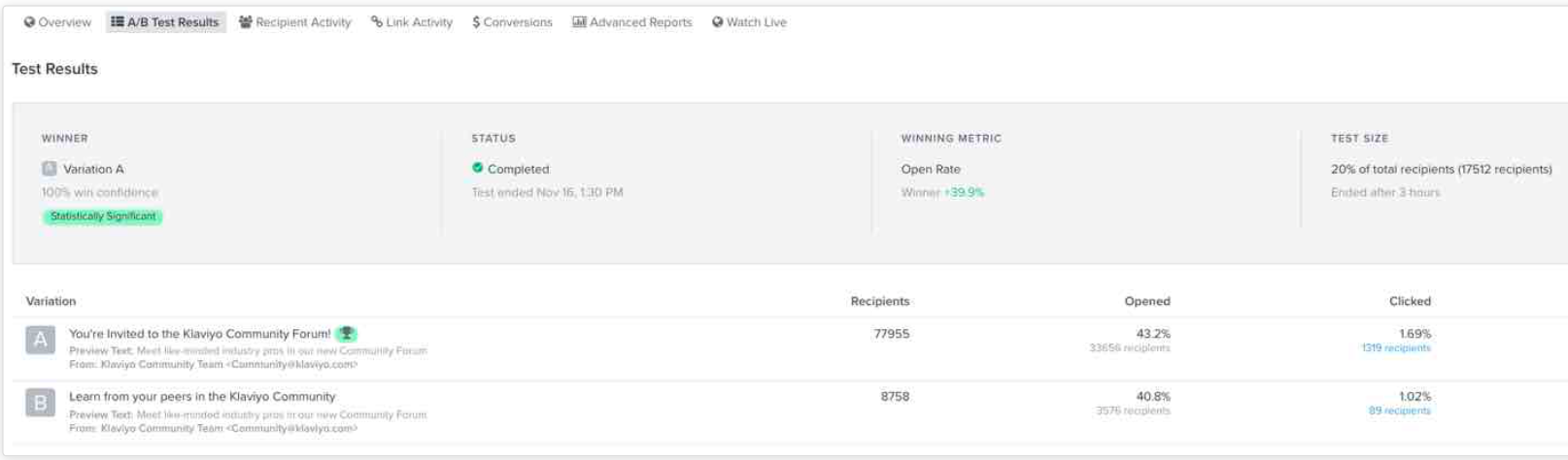
You need to determine if the results of your A/B test are statistically significant. This means that a certain variation of your test is highly likely to win over the other option(s). It also indicates that you can replicate the results and apply what you’ve learned to your future campaigns.
In the example below, the number of email recipients is large enough to make the results statistically significant.
-
Once you’ve determined statistical significance, it’s time to analyze the results. Look at the metrics you identified at the beginning of the test, and compare the performance of the test group with the control group. Identify any significant differences in performance, and evaluate what factors may have contributed to those differences.
-
Based on your analysis, draw conclusions about what worked and what didn’t work in your A/B test. Use these insights to optimize your email campaign strategy, and apply them to future campaigns.
Conclusion
That’s it! You can now run your A/B testing and continue optimizing your email marketing campaigns.
Execution Best Practices:
-
Determine the metric that you want to improve in your email campaign, such as open rates, click-through rates, conversions, or revenue.
-
Split your email list into several groups and send each group a different variation of your email.
-
Focus on testing one variable at a time to isolate its impact on the performance of your email campaign.
-
Ensure that your sample size is large enough to produce statistically significant results.
-
Analyze the performance of each version of your email, including open rates, click-through rates, and conversions.
-
Based on your results, implement the winning version of your email and continue to test and optimize.
-
A/B testing should be an ongoing process, as even small changes can make a big impact on your email campaign’s performance.