A Guide to Writing an Effective Google Ads Copy
Create efficient ad copies for your website or online shop’s Google ad campaigns.
Prefer a shortcut? 16 free tools do parts of this for you.

Aim: Create efficient ad copies for your website or online shop’s Google ad campaigns.
Optimal Outcome: A ready-made Google Ads copy template that you can use and reuse for future purposes.
What do you need to start: None.
Why is this SOP Important: Having a ready-made Google ads copy template will save you a tremendous amount of time in creating ad copies for your website or online shop’s Google ad campaigns.
When and Where to execute: You will need your Google ad copy template when creating your website or online shop’s Google ad campaigns. For the purposes of this SOP, we are going to create this ad copy template in Google Sheets. However, feel free to use your preferred spreadsheet program.
Who Should Be Doing This: The site owner, the PPC campaign manager
What is a Google Ad Copy?
A Google ad copy is the block of text that appears in Google ads. These ads are shown at the top of Google’s search result pages. The search engine platform recommends preparing at least three versions of your ad copy.
Execution
Resources/Tools & Set up
- Google Sheets (or your preferred spreadsheet program)
Setting Up The Google Ads Copy Template
-
Let’s start by creating our Google ads copy template. Open a new Google sheet and name it Google Ads Copy Template.
-
Next, we are going to add headers. These are:
-
Target Keywords
-
Headlines
-
Descriptions
-
Paths
-
Final URL
- We are also going to place LEN headers in between.
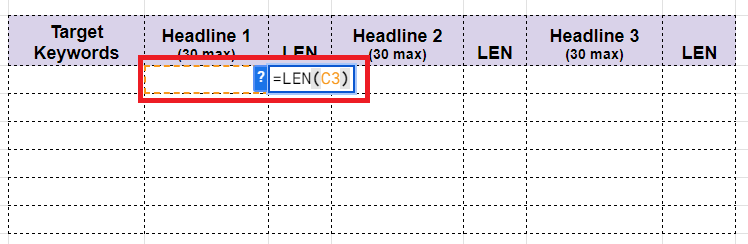
Side Note: The LEN feature counts the characters of a particular cell (spaces included). You will find this useful in ensuring that you stay within Google’s character limits.
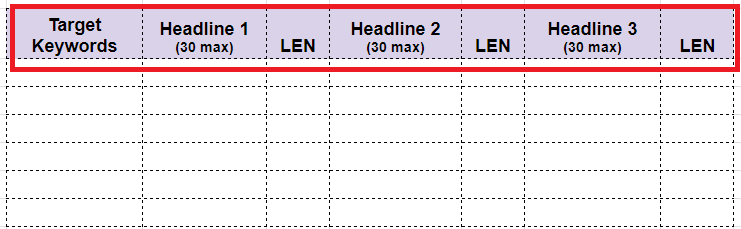
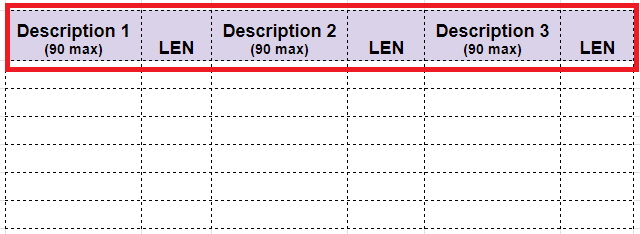
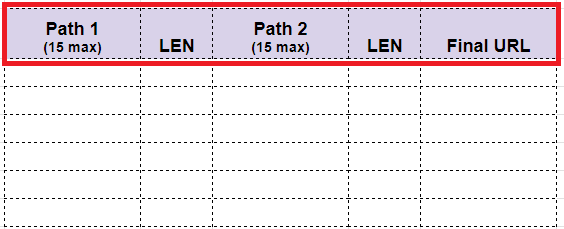
For future convenience, you may also add the character limit of each section. For Headers that’s 30, for Descriptions that’s 90, and for Paths that’s 15.
- Next, add the LEN formula for the cells under the LEN columns. The formula is =len(cell).
- OPTIONAL: You may format the headers as you see fit. You may also organize your template further by dividing the target keywords to different categories.
Here are just some ideas:
-
Product - keywords related to your products
-
Competitor - keywords related to your competitors
-
Branded - keywords from your own business or company
-
Generic - keywords that don’t fit into other categories
Using Your Google Ads Copy Template
Remember: This method that we’ll be sharing works best if your target keywords are based on products and services
Input information in the fields below:
- Headline 1 - Add an adjective (ie. best, affordable, cheap, quality, etc.) before your target keyword. See the example below.
Target Keyword: Mountain Bike
Headline 1: Best Mountain Bike

Remember: Your target keyword will always go under Headline 1. You can remove the adjective if your copy goes beyond the character limit.
- Headline 2 - CTA or Call To Action (“Buy Now”, “Try Now for Free”, “Click Here Now”). See the example below.
Headline 2: Shop Now
- Headline 3 Use one of your website or online shop’s subheadings. You may also add an offer (“30% Discount on Shipping”, “50% Off on Your First Order”). See the example below.
Headline 3: 50% Off on Your First Order
- Path 1 / Path 2 - Add other target keywords. See the example below.
Path 1: Affordable Camping Equipment
- Landing Page URL - Finally, add the URL of the appropriate landing page. See the example below.
Final URL: https://samplestore.com/best-mountain-bike
Conclusion
You’re done! Remember, crafting Google ad copies for any campaign can be tedious and time-consuming. Fortunately, setting up a Google ad copy template in advance can certainly help in making your campaigns more manageable.
-
To begin, create a new spreadsheet and name it Google Ads Copy Template.
-
Add the headers that you need and format them accordingly. For the purposes of this SOP, we have added Target Keywords, Headlines, Descriptions, Paths, and the Final URL. Add as many as you need.
-
Add LEN headers and formulas to keep track of your character counts.
-
Fill up your Google Ads Copy Template with the needed information.