Guidelines for Designing Google Display Ads
To provide you with guidelines in designing Google Display Ads for your own business or your clients’ businesses.
Prefer a shortcut? 16 free tools do parts of this for you.
Aim: To provide you with guidelines in designing Google Display Ads for your own business or your clients’ businesses.
Optimal Outcome: To help you in promoting your business through one of the most effective campaign types in Google Ads, which is the display ads.
What do you need to start: To follow this SOP, you must have a Google Ads account to make a display ad type of campaign.
Why is this SOP Important: When consumers are online surfing, viewing YouTube videos, accessing Gmail, or using mobile apps and gadgets, Google Display ads can help you advertise your product. These are the kinds of ads that you can view when you scroll down a website, like pictures, videos, or animated GIFs. The opportunity to reach a wider audience and the promotion of brand recognition are some advantages of display ads.
When and Where to execute: To execute this SOP, you will want to check whether the media that you will utilize is suitable and following the guidelines of Google Display Ads.
Who Should Be Doing This: This task should be done by the advertising or marketing team.
Google Display Ads
One of the campaign types you can use in Google Ads is Google Display Ads. Display advertising is one of the campaign types that give you more creative freedom when trying to build audience recognition for your company. It attracts bigger audiences than search advertisements ever could since it is more visually pleasing, and the material you put to it makes people more curious. Google promotes your campaign by placing the ads in any relevant area that will benefit your advertisement.
Execution
Resources/Tools & Set up
- Google Ads account
Guidelines for Google Display Ads
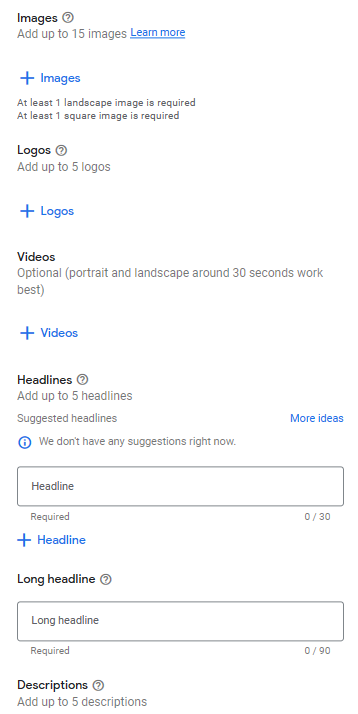
In a display ad, there are six elements needed which are the images, logos, videos, headlines, long headline, and descriptions. The following guidelines about these elements are as follows:
-
Images: You can only add a maximum of 15 images.
-
Logos: You can only add a maximum of 5 logos.
-
Videos: This media is not required, but it is recommended. The format of the video must be portrait and should only take around 30 seconds.
-
Headlines: You can only add a maximum of 5 headlines.
-
Long headline: You can only add a maximum of only 1 long headline.
-
Descriptions: Same as headlines, you can only add a maximum of 5 descriptions.
- Supported image guidelines
In a display ad, images are essential because it induces the performance of the ad based on its content. In choosing an image, you can obtain it from Google Library or create your own from scratch. To ensure that there will be no problem in displaying your images, you must adhere to its guidelines. There are three types of image formatting in a display ad: square, landscape, and portrait.
Landscape image
-
Ratio: 1.91:1
-
Minimum number of images: 1 image
-
Maximum number of images: 15 images
-
Recommended sizes: 1200x628
-
Minimum sizes: 600x314
-
Max file upload in KB: 5120 KB
-
Images per aspect ratio: 5 to 10 images per aspect ratio
Square image
-
Ratio: 1:1
-
Minimum number of images: 1 image
-
Maximum number of images: 15 images
-
Recommended sizes: 1200x1200
-
Minimum sizes: 300x300
-
Max file upload in KB: 5120 KB
-
Images per aspect ratio: 5 to 10 images per aspect ratio
Portrait image
-
Ratio: 9:16
-
Minimum number of images: 0 images
-
Maximum number of images: 15 images
-
Recommended sizes: 900x1600
-
Minimum sizes: 600x1067
-
Max file upload in KB: 5120 KB
-
Images per aspect ratio: 5 to 10 images per aspect ratio
- Use high-quality images
| DO’s | DON'Ts |
|---|---|
|
|
- Do not overlay logos on images
Logos are inserted typically on the assets aspect of the display ad. If it is included in the image, there would be repetitive messages which may overwhelm the audiences.
- Do not overlay texts on images
Similarly on logos, texts should not go overlay the display ad because it will appear repetitive and the text will be much smaller, it is disadvantageous especially for the space that it will occupy.
- Do not overlay buttons on images
Overlaying buttons are against Google Ads policy, because it creates misleading content for the viewers. Some of these buttons are “close”, “skip”, “download”, “stop” etc.
- Focus your product in the center of the image
Avoid overloading the background of your image, but instead focus it on your product that you want to promote. Make the product appear larger to make the most of your display ad.
- Do not collage images
An image collage may overwhelm the audiences. Use single images to avoid complications and appear simple when it comes to your display ads.
- Avoid backgrounds that blend in with your product
In this guideline, you are encouraged to study color contrast theory, because it appears as helpful in focusing your display ad on your product instead of its background. For instance, use black background if most of the colors that are involved in your product is white.
- Supported logo guidelines
Selection of logos also affects the appearance of your display ads. A logo that has a single background color is encouraged, and it must also have a suitable aspect ratio. Colorful logo backgrounds are strictly not recommended.
Conclusion
You’re done! Remember that designing Google Display Ads has guidelines that make your display ads have the potential to be visible and pleasing to your target audiences.
-
Although display ads reach broader audiences, it is a campaign type that is displayed over multiple websites that could generate your business a great amount of possible clients.
-
Google display ads can appear anywhere, including but not limited to Youtube videos, websites, online blogs, and even Google Mail.
-
Some of the guidelines involved in designing Google Display Ads adhere to the policies and format that Google have provided and suggested so it would be helpful to follow those.
-
Logos, images, texts, and headlines should not be overlapped with each other because it may cause confusion to the audiences so they will less likely pursue your product.
-
Backgrounds are also as important as the main object that you are trying to show off, because it has the ability to make your object pop out.
-
This type of campaign has worked magnificently for other businesses before, which encouraged brand awareness or enabled them to generate sales.