Creating an Account Structure for Google Ads Campaigns
To formulate a structure for your Google Ads Search campaigns.
Prefer a shortcut? 16 free tools do parts of this for you.

Aim: To formulate a structure for your Google Ads Search campaigns.
Optimal Outcome: You will have a structure that you can follow and implement for your Google Ads Search campaigns on Google Ads Manager.
What you need to start: Aside from having an active Google Ads account, it is also imperative to have all the information you need for launching search campaigns. These include your product and service types, campaign goals, budget, target audience, and more.
Why is this SOP Important: Having a structure you can follow and implement for your Google Ads Search campaigns will help you better manage your Google Ads account. It will also help in optimizing your campaigns and ultimately make them more efficient. Finally, doing so will also make analysis and report-making easier not just for you but for your colleagues as well.
When and Where to execute: It is ideal to have your structure set up before you launch your campaigns. You can do this on a piece of paper, a digital notepad, a word processor, or any other tool or platform that will allow you to draw images and create charts.
Who Should Be Doing This: The marketing or advertising manager.
What is a Google Ads Account Structure?
One needs a well-structured Google Ads account in order to launch optimized, strategic, and successful campaigns. Doing so will also help you determine the details of your campaigns better including the relevant keywords, ad copy, and bids.
Execution
Resources/Tools & Set up
- Any digital or non-digital tool that will allow you to create drawings. For the purposes of this SOP, we have chosen to use Google Sheets.
Explaining Google Ads’ Organization
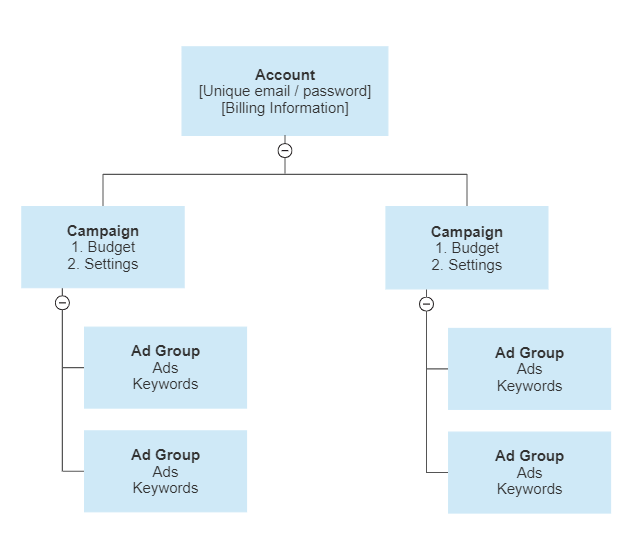
Google Ads account structure is essential in an effective campaign. The Google Ad account structure has three (3) main layers:
-
Account - The account you created in Google Ads and constitutes your email address, password, billing information, and other relevant information about you.
-
Campaigns - The campaigns you created for your advertising goals. These can have different settings to determine the type of your campaign and its associated budget. Campaigns consist of one or more ad groups.
-
Ad groups - An ad group contains one or more ads that share similar targets and are organized by a common theme. For example, separating ad groups into the different product or service types you offer.
This is how your Google Ads account structure looks like:
Designing the Structure of your Ad Account
Account Level - make separate Google Ad accounts for every website (domain) that you plan to launch ad campaigns for.
Reminder - Google recommends creating an account for each of your domains, websites, or online shops. However, as it is only a recommendation, this means that they’re not too strict about it either.
The primary reason why it’s better to keep accounts separate is to keep billing and access more organized. For instance, you’ll be able to manage different ad accounts for different clients more easily.
Campaign Level - Create campaigns for each goal, product, business model, and target market. You will find different options below:
- If your business or client offers only one product or service to market:
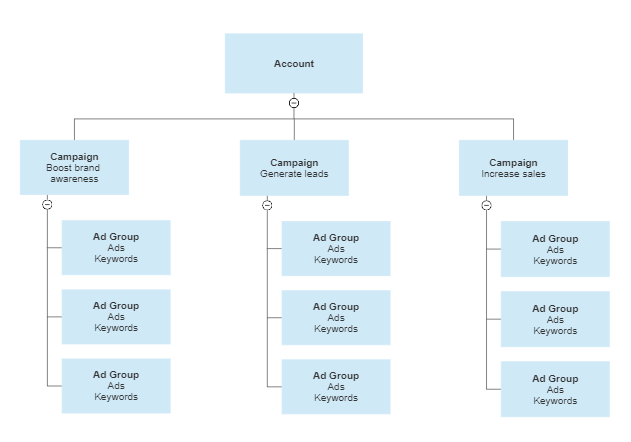
Create a campaign for each of your goals. We recommend this structure if you’re designing a product’s sales funnel. Essentially, you first make people aware of your product. Afterward, you make them subscribe to a regular business offering (newsletter, coupons, etc.). Finally, you can have them purchase your product or service.
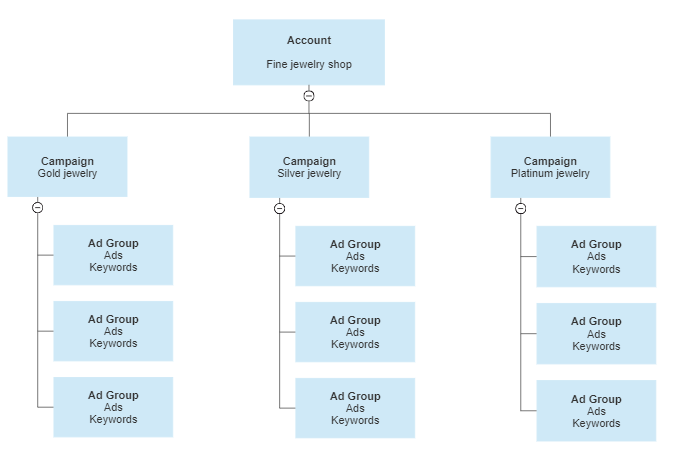
- If your business or client offers multiple brands, services, or eCommerce products to market:
Create a campaign for every type of product. Below is a sample structure for an e-commerce site that sells fine jewelry.
Reminder: You might end up with too many campaigns if you’re planning to make a campaign for every product type and each sales funneling stage. While there’s no problem in doing so, we can only recommend doing this if your budget is enough for all those campaigns. Keep in mind that each campaign can cost a minimum of $10 to $50 per day.
-
If you plan on bidding on your competitor’s keywords, then make one campaign for you or your clients’ business-branded keywords, non-branded keywords, and competitor-branded keywords.
-
If you offer your products across multiple geographic locations or you want to extend your reach in a multilingual county, then you may make a campaign for every local language.
-
If you plan to create a separate campaign for those who interacted with you or your business (e.g. email subscribers, past customers, website visitors).
This method will also work in remarketing campaigns.
Ad Group Level
It is recommended to choose keywords that are most relevant to your ad copies and landing pages for each of your ad groups.
Here’s an ad group depending on different business models and goals.
Reminder: The ad groups you’ll find in these examples are meant for a single category (such as a product or service type). These should already have been defined in the campaign level.
- Ad groups for an eCommerce product category (Gold necklaces).
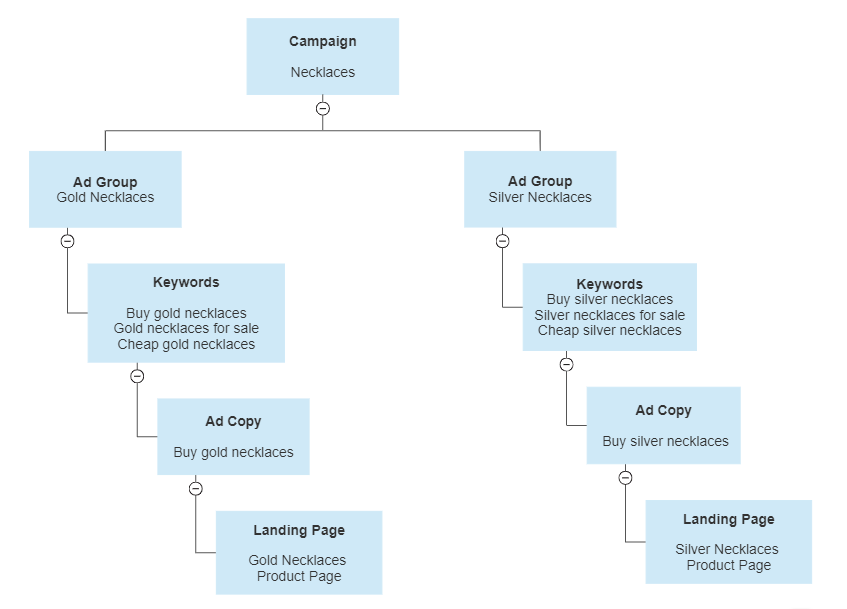
Reminder: We’ve simplified the example ad groups above and below for illustration purposes. Note that it may not be as simple as making ad groups for various product categories. The recommended practice is to organize your keywords and ad groups around a common theme (such as identical keywords or keywords with similar meanings).
Take the sample structure above, “Cheap Gold Necklaces” can be an ad group if there are enough related keywords and search volume. Here’s an example:
Ad Group: Cheap Gold Necklaces
Keywords: “Best cheap gold necklaces”, “Cheap 14k gold necklaces”, “Cheap pre-owned gold necklaces”
Ad copy: “Best cheap gold necklaces for sale”
Landing page: Affordable gold necklaces product page
Pro tip: When choosing keywords for an ad group, think about the landing page they’ll visit. Do the keywords relate to the ad copy’s core message and landing page? If you answered no, then it’s better to make a different ad group for them instead.
Conclusion
You’re done! Remember, designing a structure for your Google Ads account before you set out to launch your campaigns and ads will significantly impact the efficiency of your advertising efforts.
That’s because it will make your campaigns more manageable and easier to track. This is even more crucial when you’re managing multiple accounts for various agencies, clients, websites, and online shops.
-
You may use any digital or non-digital tool to plot your account structure.
-
For the purposes of this SOP, we have used Google Sheets.
-
The account structure will have three levels: account, campaign, and ad groups.
-
You may create different accounts for each website or online shop.
-
You may create different campaigns for different products, services, goals, and business models.
-
Make sure that your keywords, ad copies, and landing pages are aligned with each other.