Finalizing a Bid Strategy for Google Ads Campaigns
To determine the most suitable bidding strategy for your Google Ad campaigns.
Prefer a shortcut? 16 free tools do parts of this for you.
Aim: To determine the most suitable bidding strategy for your Google Ad campaigns.
Optimal Outcome: Set up the most suitable bidding strategy that will help you accomplish your Google Ad campaign goals.
What you need to start: You will need an active Google Ads account.
Why is this SOP Important: Your bidding strategy will greatly impact the performance of your Google Ad campaigns.
When and Where to execute: This SOP is performed when you’re launching a Google Ad campaign. It is done on the Google Ads Manager platform.
Who Should Be Doing This: The marketing or advertising manager
What is bid strategy in Google Ads?
As an advertiser, your bid represents the amount of money you will spend for a single click on a keyword in Google Ads. There are different types of bid strategies in Google Ads that you can choose depending on your spending budget and marketing goals. Most advertisers focus their bids on clicks, views (for video ads), impressions, or conversions.
Execution
Resources/Tools & Set up
- An active Google Ads account
Setting a Bid Strategy for Brand Visibility
Who is this for: New websites or online shops that seek to establish their claim on particular keywords. For instance, an HVAC store wants their advertisements to get displayed when users look for “Best HVAC supplier in Kansas”.
Aim: To add awareness to your brand especially when people look for business-related keywords.
This bid strategy prioritizes your appearance at the top of Google search results to make your brand more visible to the public.
Reminder: Your ads can still pop up in Google’s search results, but their interaction rate with the searchers may be low.
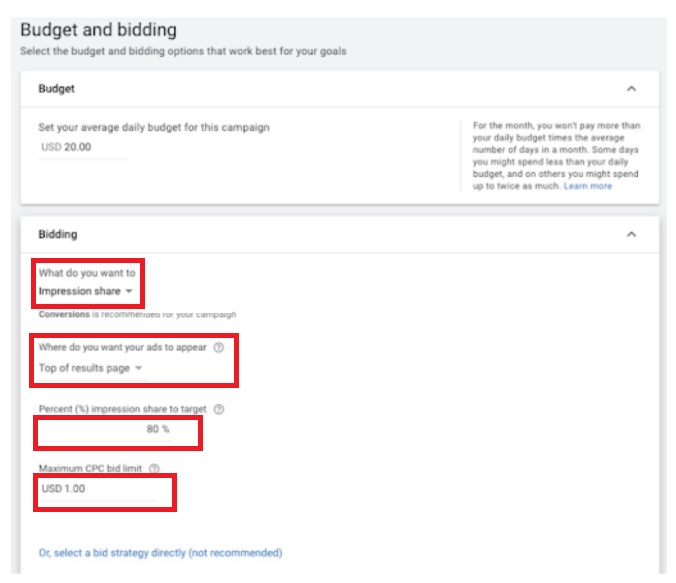
When Budgeting and Bidding:
-
Budget - Allocate a specific budget for the entire campaign.
-
Bid Focus - Set the bid focus to Impression share
-
Where do you want your ads to appear - You have 3 options to choose from depending on your goals.
-
Anywhere on the search results page (This is the least competitive).
-
Top of results page (This is somewhat competitive).
-
Absolute top of the results page (This is the most competitive).
-
-
Percent (%) impression share to target - This will allow you to allocate a specific percentage for how likely your ads will show for target keywords. For instance, setting a 70% impression share will make Google Ads set your Cost Per Click (CPC) bids at around 70% of the times they could show up in search results.
-
Maximum CPC bid limit - This is optional, but we recommend setting it since this is the highest amount you pay for every click. To get an accurate estimate of this bid’s budget, look for the history of your keywords’ cost per click. Afterward, add 10% to 20% to the average cost to add more success chance to this bid.
Setting a Bid Strategy to Increase Website Traffic
Who is this for: New websites or online shops (especially those launching their ad campaign via Google Ads for the first time) that seek to boost their traffic coming from Google.
Aim: To increase web traffic from Google.
This bid strategy prioritizes showing ads to searchers that are more likely to click on ads with the lowest CPC.
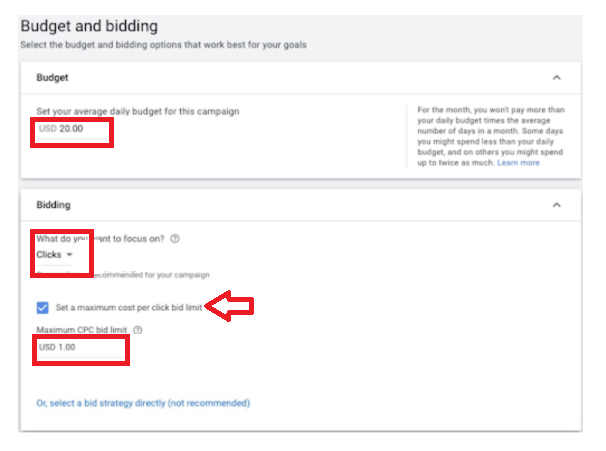
When Budgeting and Bidding:
-
Budget - Allocate a specific budget for the entire campaign.
-
What do you want to focus on? - Set to Clicks. Doing this will set your bidding strategy to “Maximize clicks”, allowing Google Ads to set your bids automatically. This will help you get the most clicks possible within your budget.
-
Tick “Set a maximum cost per click bid limit” - This will set the max amount that each click will cost.
-
Maximum CPC bid limit - look for the history of your keywords’ cost per click. Afterward, add 10% to 20% to the average cost to increase the likelihood of your bid’s success.
Setting a Bid Strategy to Generate Leads
Who is this for: Websites or online shops that generate traffic from Google and want to have their online visitors subscribe, sign up, or fill up a form. For instance, a marketing company that runs a Google ads campaign with the goal to collect potential clients’ contact information.
Aim: To garner the highest number of leads even with the lowest cost per acquisition. This bidding strategy prioritizes showing your ad to people that have the highest chances of converting into paying customers.
When Budgeting and Bidding:
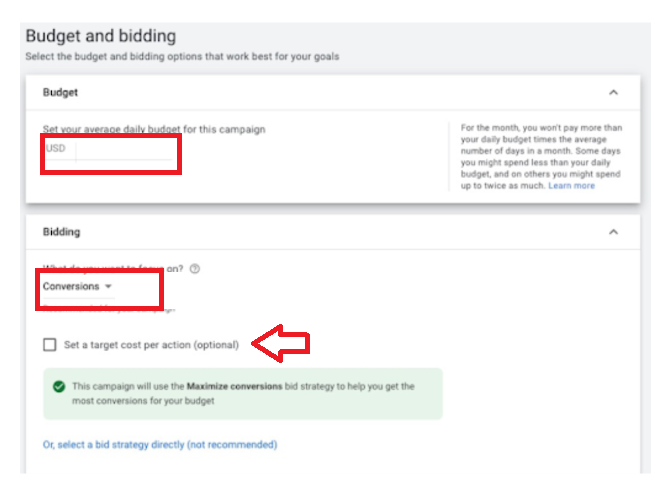
Budget - Allocate a specific budget for the entire campaign.
What do you want to focus on? - Set to Conversions. Doing this will set your bidding strategy to “Maximize conversions”, allowing Google Ads to set your bids automatically. This will help you get the most clicks possible within your budget.
Reminder: If the account you’re running a campaign for is still new and/or with little to no history of conversion data, then this bidding strategy will probably fail. We recommend you first start with bidding strategies that can maximize clicks. This way, you can increase your click volumes before running a conversion-based campaign.
Target Cost Per Action - This step is optional but recommended should you or your clients are willing to get a lead within a set amount. Tick this to enable Google Ads to bid automatically and get as many lead conversions as possible or under the cost-per-action goal.
Reminder: Google will not spend your set daily budget when you set a target Click Per Action but Google cannot be acquired using the set budget.
Setting a Bid Strategy to Increase Sales and Profits
Who is this for: Websites or online shops that seek to increase the revenue they’re already earning from Google traffic. Instances where this can be applied include websites selling informational products, eCommerce stores, and SaaS (Software as a Service) companies.
Aim: To boost the volume of your sales or to produce the maximum return on ad spend.
This bidding strategy prioritizes advertising to people that are more likely to spend on your website at a profitable acquisition cost.
When Budgeting and Bidding to Increase Sales:
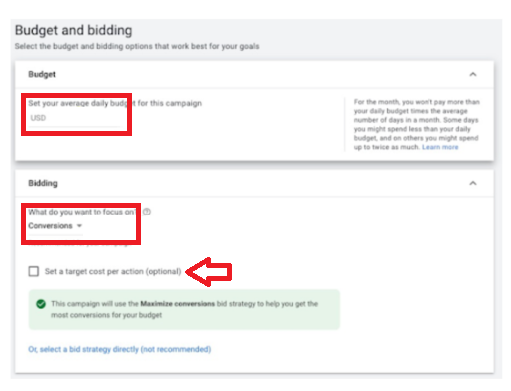
-
Budget - Allocate a specific budget for the entire campaign.
-
What do you want to focus on? - Set to Conversions. Doing this will set your bidding strategy to “Maximize conversions”, allowing Google Ads to set your bids automatically. This will help you get the most clicks possible within your budget.
Reminder: If the account you’re running a campaign for is new with little to no history of conversion data, then this bidding strategy will probably fail. We recommend you first start with bidding strategies that can maximize clicks. This way, you can increase your click volumes before running a conversion-based campaign.
- Set a target cost per action - This step is optional, but recommended should you or your clients are willing to get a lead within a set amount. Tick this to enable Google Ads to bid automatically and get as many lead conversions as possible or under the cost-per-action goal.
When Budgeting and Bidding to Maximize Ad Spend:
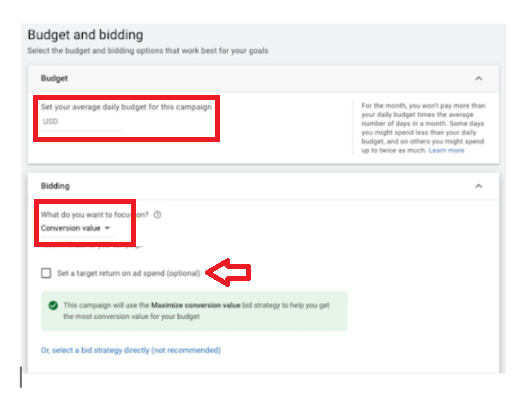
-
Budget - Allocate a specific budget for the entire campaign.
-
Bid Focus - Set to Conversion value. Doing this will set your bidding strategy to “Maximize Conversion Value”, allowing Google Ads to set your bids automatically. This will help you get the most conversion value possible within your budget.
We recommend setting your strategy to Maximizing Conversion Value if each conversion has different values. Google can then optimize for all the campaign conversion’s cumulative value.
Reminder: If the account you’re running a campaign with is new with little to no history of conversion data, then this bidding strategy will probably fail. We recommend you first start with bidding strategies that can maximize clicks. This way, you can increase your click volumes before running a conversion-based campaign.
- Set a target return on ad spend - This step is optional, but recommended should you or your clients are willing to get a lead within a set amount. Tick this to enable Google Ads to bid automatically and get as many lead conversions as possible or under the cost-per-action goal.
Reminder when setting the target return on ad spend: If you set your goal to be an average of $2.50 in sales for every $1 you spent on ads, your ROAS goal would be 250%. Google will not spend your set daily budget when you set a target Click Per Action but Google cannot be acquired using the set budget.
Finding your Keywords’ Cost Per Click history
You can skip this step unless you like to estimate and allocate a maximum CPC in your bidding strategy.
-
Login to your Google Ads account.
-
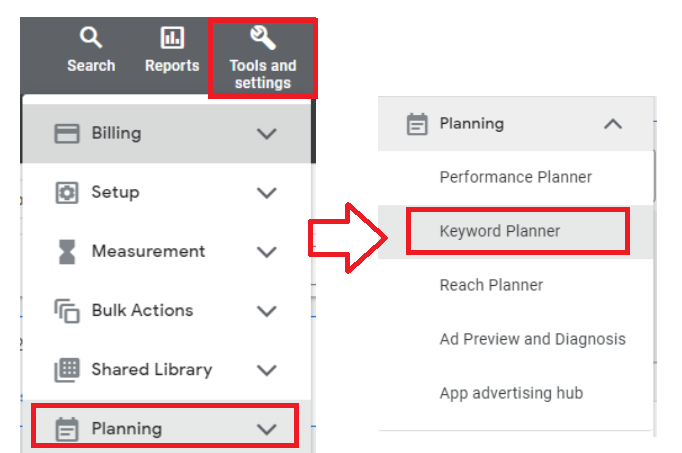
Click Tools & Settings from the top navigation. Select Planning, then Keyword Planner.
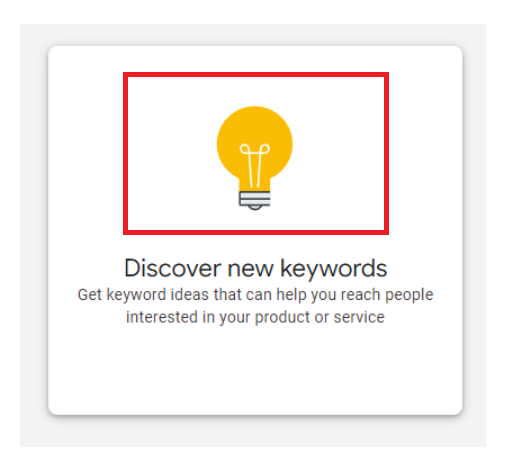
- This will open a new window. Select Discover new keywords.
- Input a maximum of 10 keywords related to your niche, website, or online shop.
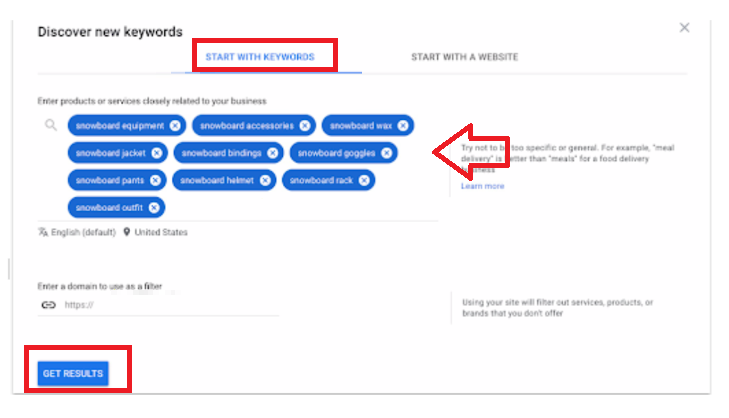
- Then, click on Get results. Once here, you’ll see a keyword list of available ideas based on the keywords you entered earlier.
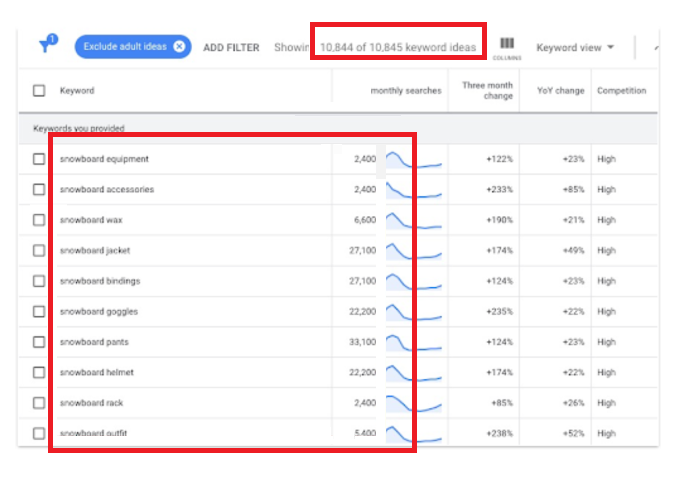
- Search for the metric named Top of page bid (low range), which is the minimum CPC other advertisers bid to get to the top of results pages.
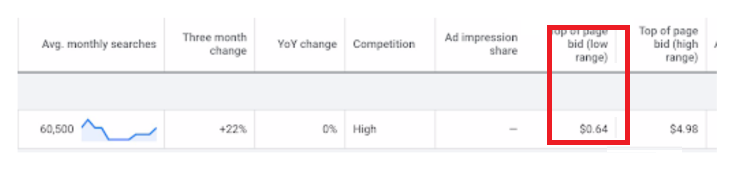
- Then, estimate the max CPC and bid slightly upwards of the average CPC for your keywords.
Conclusion
You’re done! Remember, understanding the most suitable bid according to what you want to achieve with your Google Ad campaign is crucial for its success.
-
There are four main goals that you can achieve from a sound Google Ad bid strategy. These are to increase brand visibility, increase website traffic, generate leads, and increase sales and profits.
-
Once you have determined the most appropriate bids, you may then move on to the other aspects of setting up your Google Ad campaign.