How to Conduct a Comprehensive Audit of Your Facebook Ads Account
To audit your own or your client’s ad account to identify opportunities to improve and issues that need to be fixed.
Prefer a shortcut? 16 free tools do parts of this for you.

Aim: To audit your own or your client’s ad account to identify opportunities to improve and issues that need to be fixed.
Optimal Outcome: Determine what’s working and not working on the ad account and plan your next steps for your ad campaign.
What do you need to start: Access to Facebook Business Manager
Why is this SOP Important: Auditing Facebook Ads is an important step in ensuring that your ad campaigns are effective, efficient, and compliant. It can help you optimize your ad spend and improve your ROI, while also ensuring that you’re following best practices and avoiding costly mistakes.
When and Where to execute: Facebook Business Manager
Who Should Be Doing This: Marketing staff, media buyer
What is Facebook Ads account audit
A Facebook Ads account audit is a review of your ad campaigns on Facebook to evaluate performance and effectiveness. The audit assesses various aspects of your campaigns, including campaigns structure, targeting, ad creative, bidding and budgeting, and analytics and reporting. The objective of an audit is to identify areas where your campaigns can be optimized and provide recommendations to improve their performance.
Execution
Items to Review:
-
Ad Account Structure
-
Tracking Setup
-
Audience and Interest Targeting
-
Ad Copy and Creative
-
Overall Account Performance
Ad Account Structure
Why is this important?
To make reporting and campaign optimization less challenging in the future, it is important to organize the ad account. Additionally, organizing the account will enhance your workflow for future handovers.
What to audit:
-
Your ad account should follow a logical and accurate naming convention.
-
Your ad account has the most optimal structure in place.
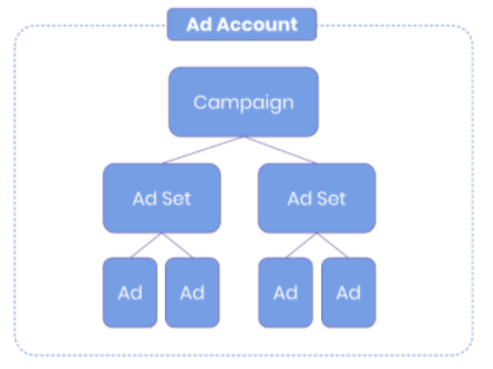
-
Your Facebook structure ideally should look like this:
-
Ad Account — Each business or brand should have one ad account.
-
Campaign — Create at least one new campaign for each business objective.
-
Ad Set — Each ad set serves a specific audience or interest.
-
Ad — Each ad serves a different marketing angle or headline.
-
To get the full guide on structuring your Facebook Ad account, follow SOP ___: The Facebook Ad Structure.
2. Audit if the naming convention follows a logical pattern. Having a solid, well-structured naming convention helps you easily identify campaigns, ad sets and ads more easily which will save you time in the long run.
-
Campaign — What is the campaign about and its objective.
-
Adset — What is the target audience, device, and demographics.
-
Ad — What is the key messaging in this ad.
For a full guide on setting your Facebook Ads naming convention, follow SOP 027: Integrating Naming Convention on Facebook Ads Account.
Tracking Setup
Why is this important?
Tracking is essential for measuring the success of your ad campaigns, identifying issues, refining your targeting and ad strategy, and ultimately maximizing your return on ad spend. If the Facebook Pixel is not set up properly, your ad account may be over- or under- reporting.
What to audit:
-
Facebook pixel is firing in the right pages and sending the right data.
-
Destination URL’s UTM parameters are set up and are tracking properly.
-
Domain ownership verified.
-
Conversion events are set up, prioritized, and triggered accurately.
-
Make sure the Facebook Pixel is installed and firing correctly.
-
Install the Facebook Pixel Helper Chrome plugin.
-
Compile a list of URLs of the website to audit such as home page, landing pages, sales pages etc.
-
For each URL on the list
-
i. Check if the Facebook Pixel is firing and installed correctly.
ii. Check if the conversion tracking is set up correctly by following this guide, SOP 013: How to Set Up Facebook Conversion Tracking Code.
2. Review UTM parameters.
-
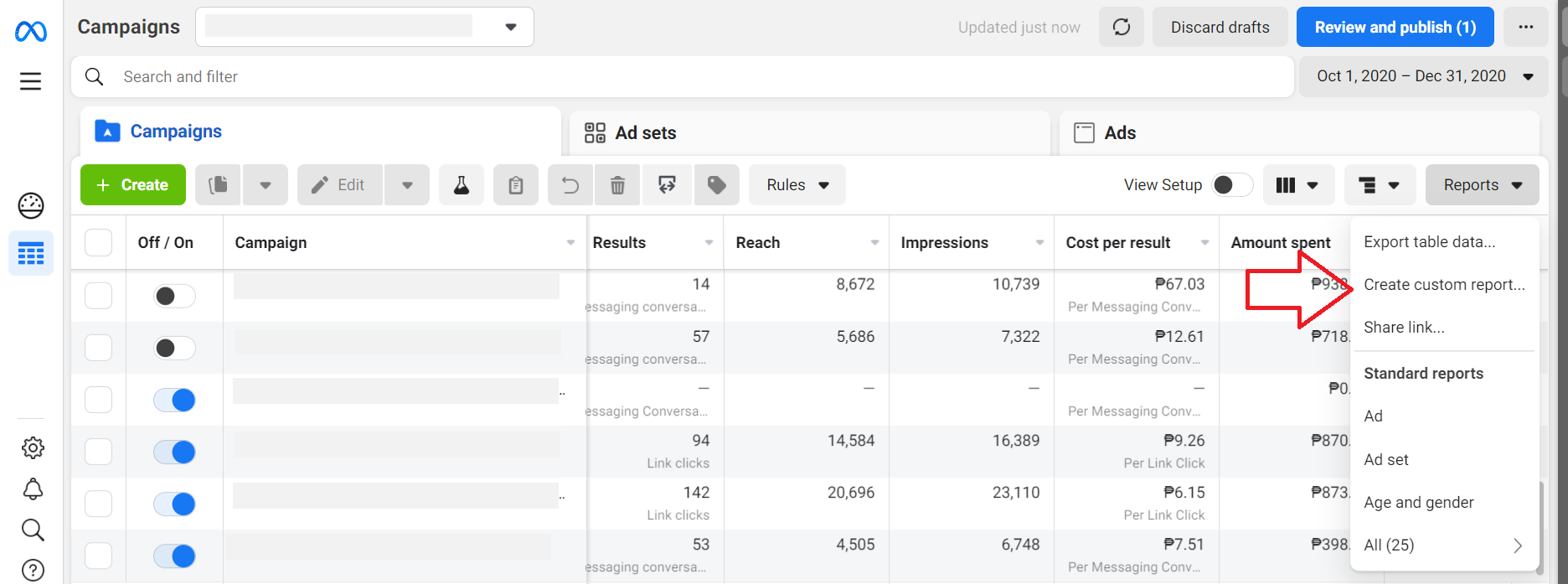
Compile a list of landing pages from your ads. To do this, login to Facebook Ads Manager.
-
Click Reports, then select Create Custom Reports.
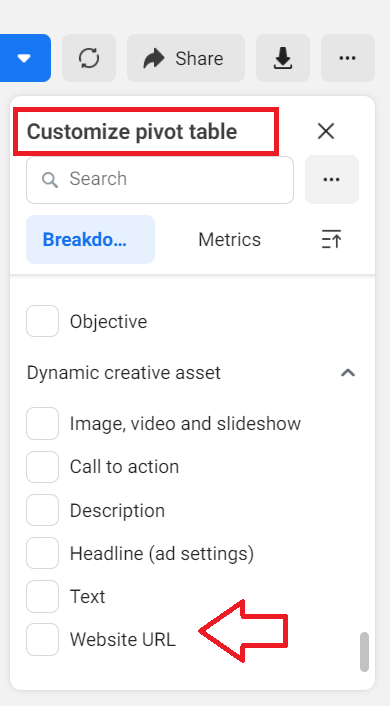
- Navigate to the right panel, under Customize Pivot Table section, check the box next to Website URL.
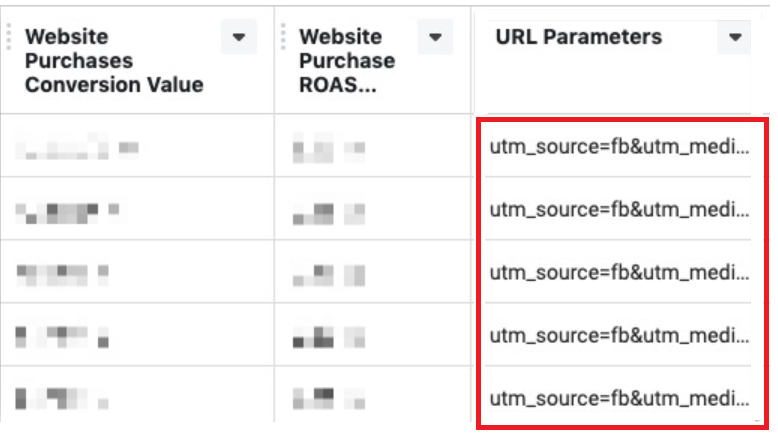
- Make sure all URLs include the appropriate UTM parameters.
Example:
utm_source=Facebook
utm_medium=ppc
utm_campaign=lead-generation
3. Make sure that you have completed the domain verification process in Facebook Business Manager. If not, follow this guide to verify your domain: SOP 028: How to Verify Ownership of Your Domain in Facebook Business Manager.
4. Make sure your conversion events are configured correctly. If you haven’t configured your conversion events yet, follow this guide SOP 029: How to Set Up Your Facebook Ads Conversion Events.
Audience and Interest Targeting
Why is this important?
Auditing your audience and interest targeting is a crucial step in creating an effective and successful ad campaign.
What to audit:
-
Identify audiences to keep or remove based on performance.
-
Identify new cold or warm audiences to add to your strategy.
-
Review the current customer persona plan with your marketing team or with your client.
-
Compare the customer persona with the current audience set and see if the demographic and interests being targeted are the same.
-
If the audience targeting does not match the customer persona, check the performance of the audience set and compare with your KPI.
Example: If your KPI is revenue, check the return on revenue (ROAS) for your ad set.
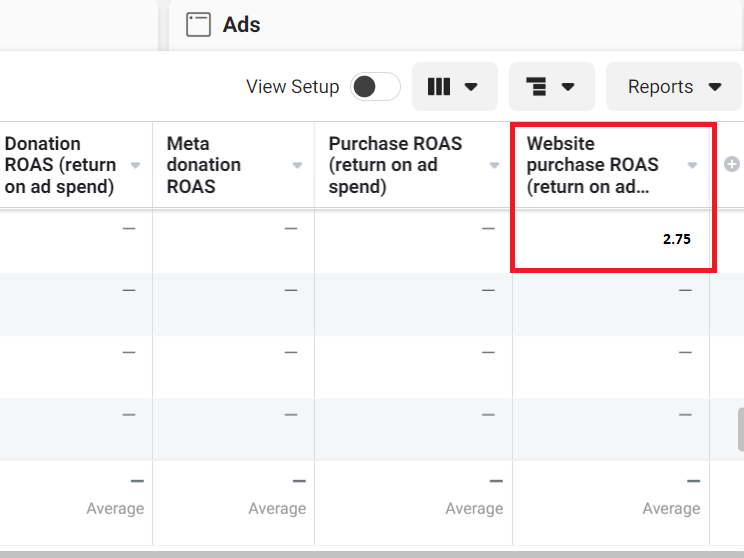
- Check and assess if your audience is too broad or too narrow.
-
Cold audience should have at least 200,000 to 5M people potential reach.
-
Warm audience depends on the list or pixel used for retargeting.
- Review audience segmentation and check if the current ad set or campaign structure differentiates targeting between cold and warm audiences.
Note: Your ad sets should not mix cold and warm audiences
Cold audience — Target people based on interest, demographics, location, and behavior.
Warm audience — Target people who have previously interacted with your website or brand.
Ad Copy and Creative
Why is this important?
To identify low quality ad creatives and identify opportunities to improve on your current ads.
What to audit:
-
Ensure all ads have clear call to action (CTA)
-
Remove redundant ad / creatives
-
Identify mismatch landing page messaging
-
Improve ads with low quality score
- Ensure all ads have a clear call to action (CTA).
Examples:
Get up to 60% off. Get offer!
Try the app FREE for 30 days. Learn More.
Schedule your first visit. Book now!
-
Check that each ad has a unique marketing angle, such as benefit, value proposition, pricing, audience etc.
-
Make sure that the messaging matches the landing page.
Example: If the CTA is Sign up now! Make sure that the landing page is where the customer can fill out a form to sign up.
- Check the quality score of each ad / creative and make sure that they at least have a score of Average.
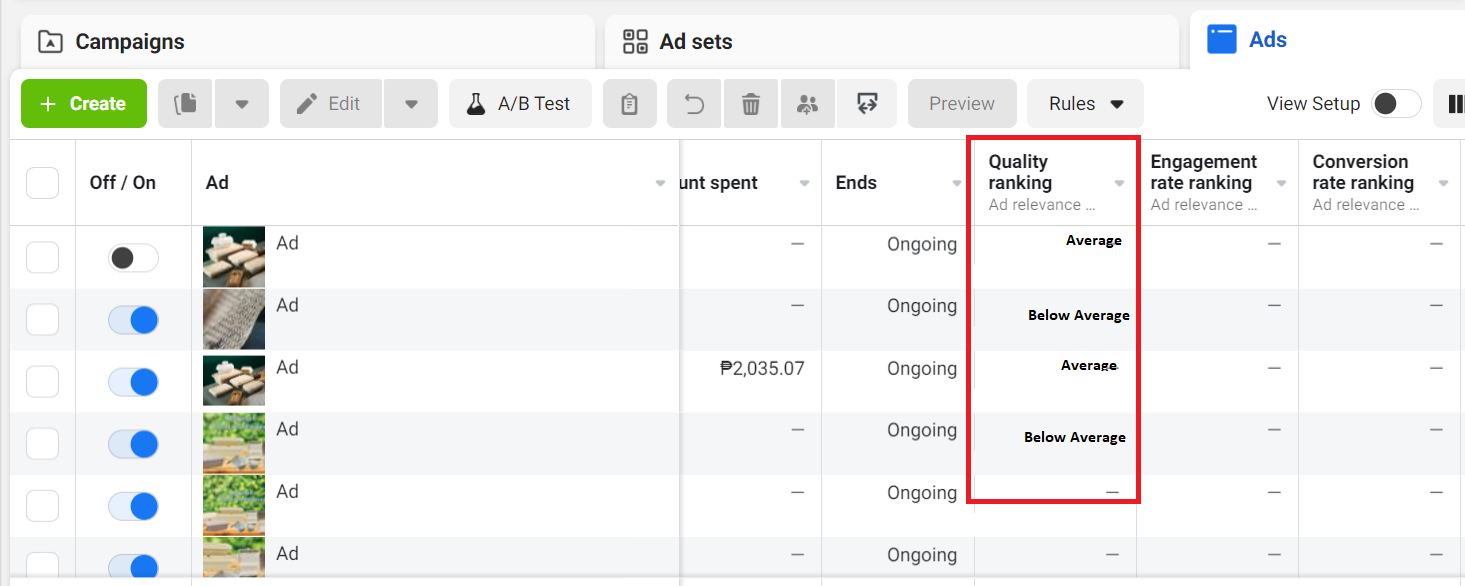
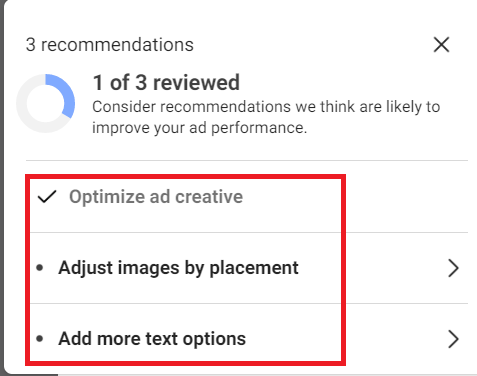
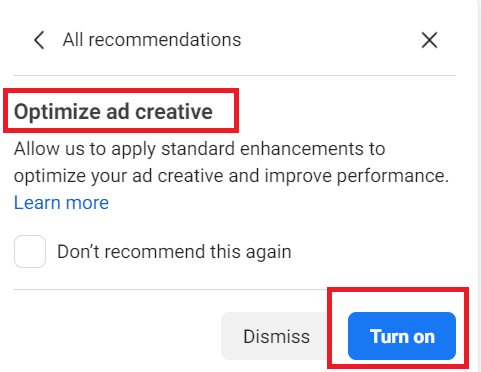
- If ad quality is below average, you can manually improve the components of your ad such as adding images, text etc. You can also use Facebook Ad Manager to optimize your ad.
Overall account performance
Why this is important: Reviewing your ad account’s overall performance helps you identify low performing ad campaigns, ad sets, or ads which you can then improve and optimize for better results.
Ideal Outcome:
-
Identify Campaigns, Ad Sets, and Ads with the lowest performance (high CPA, low ROAS, low conversions, etc)
-
Create action plans to improve results
- Review current Ad Spend distribution by sorting the campaigns by Amount Spent and determine the high-spending campaigns along with their return on ad spend (ROAS) or Cost per Action (CPA).
Typically, it's preferable to allocate the majority of the budget to the most lucrative campaigns. However, if there are campaigns that are underperforming but still receiving a substantial budget, it may signal an opportunity for enhancement.
Conclusion
That’s it! You now have a structure in auditing your Facebook Ads account. Be sure to run this audit periodically to continuously improve your results.
Execution Checklist
You should audit the following on your Facebook Ad Manager.
-
Ad account structure
-
Tracking setup
-
Audience and interest targeting
-
Ad copy and creative
-
Overall account performance