Syncing Discounts to Sales Channels in Shopify
To sync discounts to sales channels in Shopify for easy and effective management of promotions.
Prefer a shortcut? 16 free tools do parts of this for you.

Aim: To sync discounts to sales channels in Shopify for easy and effective management of promotions.
Optimal Outcome: Discounts are synced to all relevant sales channels and customers can easily access and redeem them.
What do you need to start: To perform this SOP, you will need a Shopify account, sales channels added to your Shopify store and discounts created in Shopify.
Why is this SOP Important: Syncing discounts to sales channels in Shopify is important to ensure that promotions are easily accessible and redeemable by customers across all sales channels. It helps to improve customer experience and increase sales by promoting your products and services effectively.
When and Where to execute: This SOP can be executed anytime a new discount is created or when an existing discount needs to be synced to sales channels. It can be executed from any location with internet access.
Who Should Be Doing This: This SOP can be carried out by any authorized Shopify store admin or staff member responsible for managing promotions and sales channels.
Why do you need to sync discounts to sales channels?
A discount is a promotional strategy that allows customers to purchase products or services at a lower price than the regular or original price. Discounts are usually offered for a limited time or as a reward for loyalty or as an incentive to attract new customers.
Discounts are important for you to sync to your sales channels because they can help increase your sales and attract more customers to your store. By offering discounts on your products, you can entice shoppers to make a purchase that they may not have otherwise made. Additionally, syncing your discounts to your sales channels can ensure that all of your potential customers have access to the same discounts and deals, no matter where they are shopping from.
Execution
Resources/Tools & Set up
-
Shopify account
-
Sales channel connected to your shopify store
-
Discounts created on Shopify
Implement discounts across sales channel
To implement your discounts across sales channels, you need to follow these steps:
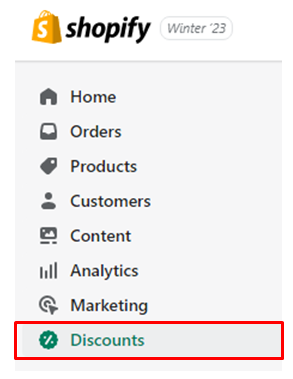
- Access your Shopify admin and navigate to the “Discounts” page.
-
Click on the discount that you wish to edit. If you do not have a discount set up yet, go to SOP 172 to learn how to create discounts on Shopify.
-
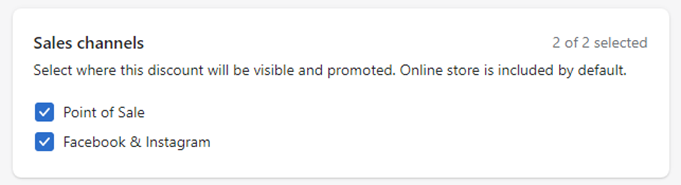
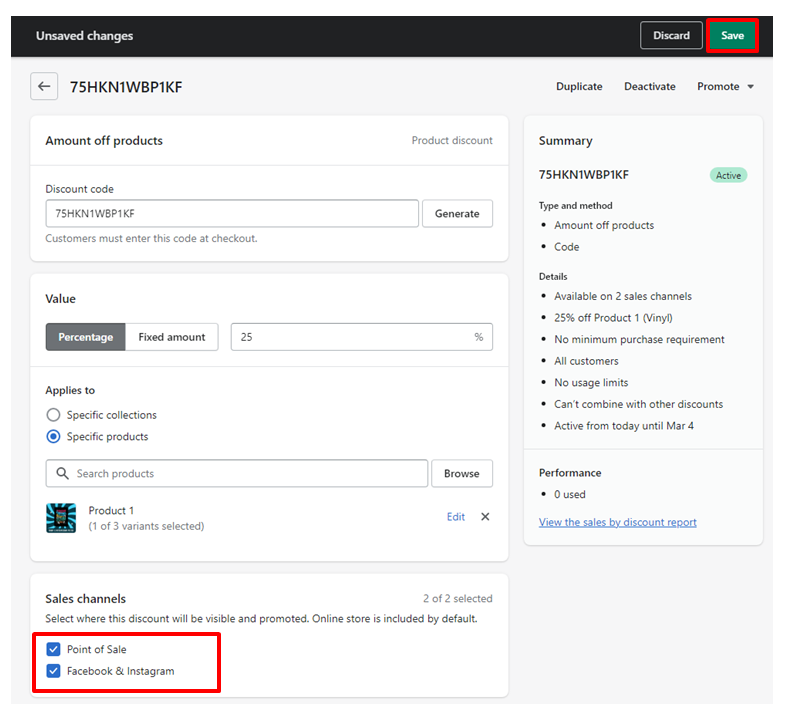
Scroll down to the Sales channels section and choose the sales channels that you want your discount to be available on.
- Once you've selected your desired sales channels, click on the Save button to save your changes.
Set discounts availability
To control which sales channels can access your discounts, you can manage their availability through the following steps:
-
In your Shopify admin, navigate to “Discounts”.
-
Choose the discount you want to edit.
-
In the Sales channels section, check or uncheck the boxes next to the sales channels you want to enable or disable.
-
Click “Save” to apply your changes.
💡Tips on choosing which sales channel to apply your discounts to:
-
Analyze your customer behavior: Take a look at your sales data to determine which sales channels your customers tend to use the most. This will help you prioritize which channels to offer your discounts on.
-
Consider your marketing strategy: Think about which sales channels you actively promote to your customers through email marketing, social media, or other advertising methods. These channels may be a good place to offer discounts to help incentivize sales.
-
Evaluate your profit margins: Make sure you're not offering discounts on sales channels that could potentially hurt your profit margins. Consider offering discounts on channels where your profit margins are higher, such as your own website or a marketplace that offers lower fees.
-
Check your competitors: Research your competitors to see which sales channels they are offering discounts on. This may give you an idea of where you can be competitive and offer discounts as well.
-
Test and measure: Don't be afraid to experiment and try out different sales channels for your discounts. Test out different channels and analyze the results to see which ones perform the best for your business.
Conclusion
You’re done! In conclusion, syncing discounts to sales channels in Shopify can help increase sales and attract more customers to your online store. By following these simple steps, you can easily manage the availability of your discounts across different sales channels. It is important to choose the right sales channels to apply your discounts, and to regularly review and adjust your discount strategies to ensure their effectiveness. With proper discount management and syncing, you can optimize your sales channels and grow your business.
Execution Checklist:
-
Go to "Discounts" in your Shopify admin.
-
Select the discount you want to edit.
-
Choose sales channels for the discount
-
Click “Save” to apply your changes.