Pre-filling Customer Information in Shopify
To save customers time by allowing Shopify to prefill their checkout with their information
Prefer a shortcut? 16 free tools do parts of this for you.

Aim: To save customers time by allowing Shopify to prefill their checkout with their information
Optimal Outcome: Saving time on the checkout page earns brownie points for the customer because they don’t have to input their information, especially if they’re doing repeat orders
What you need to start: Shopify account
Why is this SOP Important: You want your customers to be happy at how quickly and easily they can check out their items in your Shopify store
When and Where to execute: Perform this SOP as you set up your Shopify store
Who Should Be Doing This: The person assigned to manage your Shopify store
What Is Customer Information?
Customer information often consists of the name, contact number, and address that Shopify requires to ship the orders to the right person at the right address. To make it easier for your customers, Shopify prefills the needed customer information so your buyers don’t need to spend time inputting them. However, the app can only do so if they tick on “Save this information for next time” during checkout.
Execution
Resources/Tools & Set up
- Shopify account
How to Edit Checkout Options
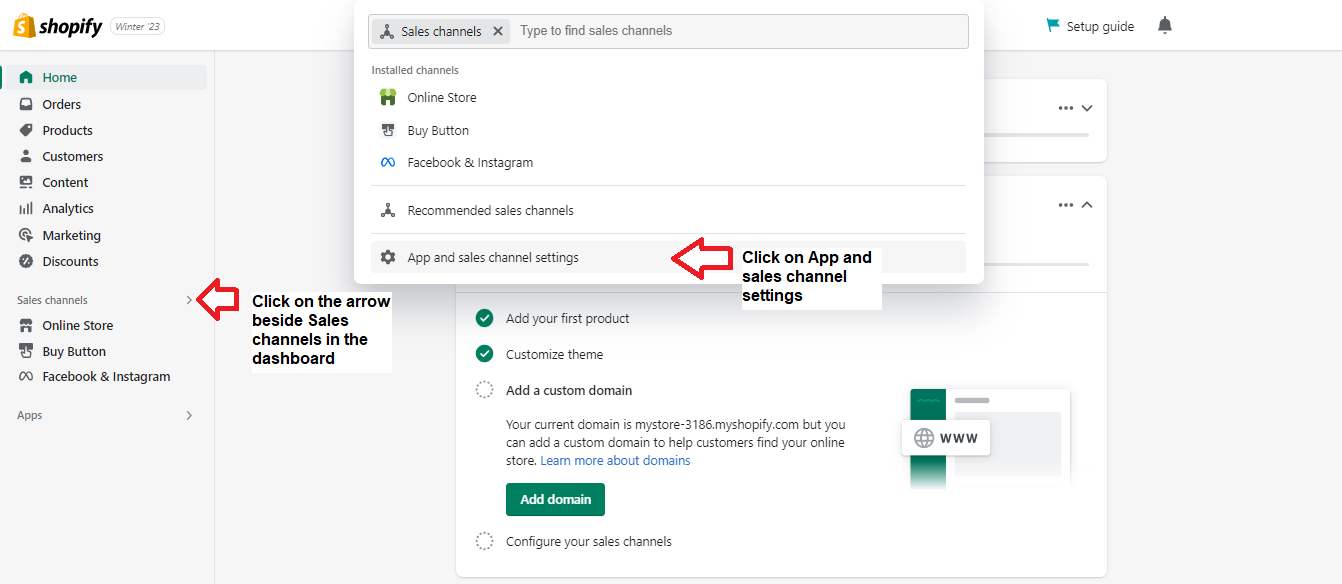
- Log into your Shopify account, then click on the arrow beside the sales channels so the popup screen appears. Click App and Sales channels settings.
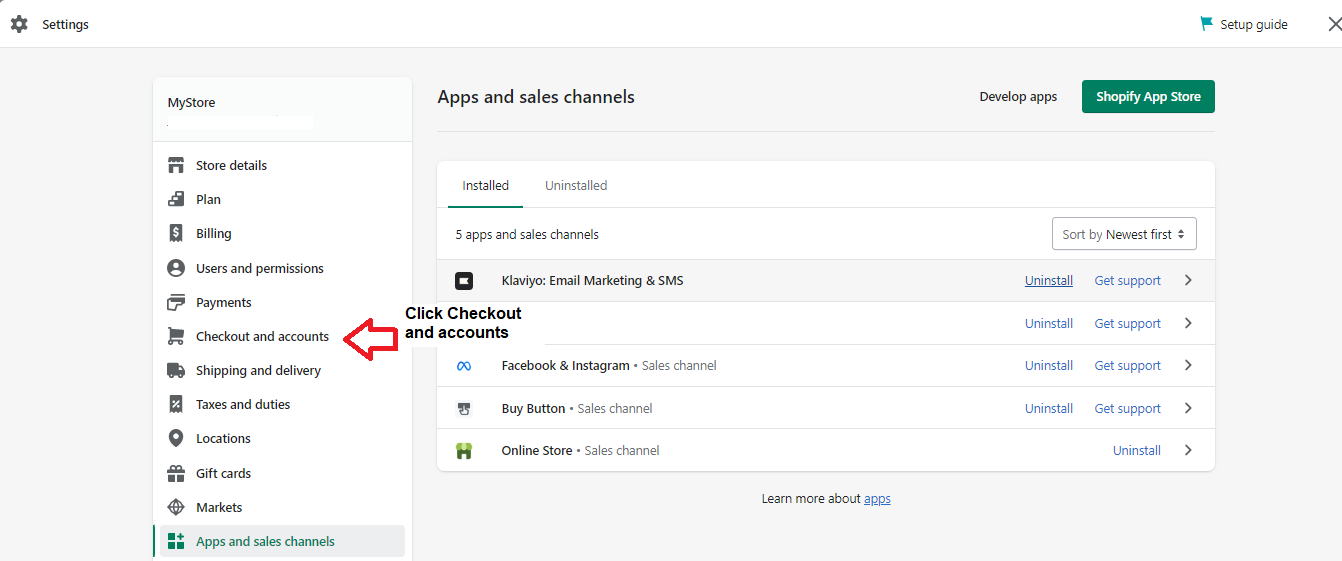
- The Settings popup screen will appear. Click checkout and accounts.
- Under the Customer information, you can only choose to make the fields optional, hidden, or required.
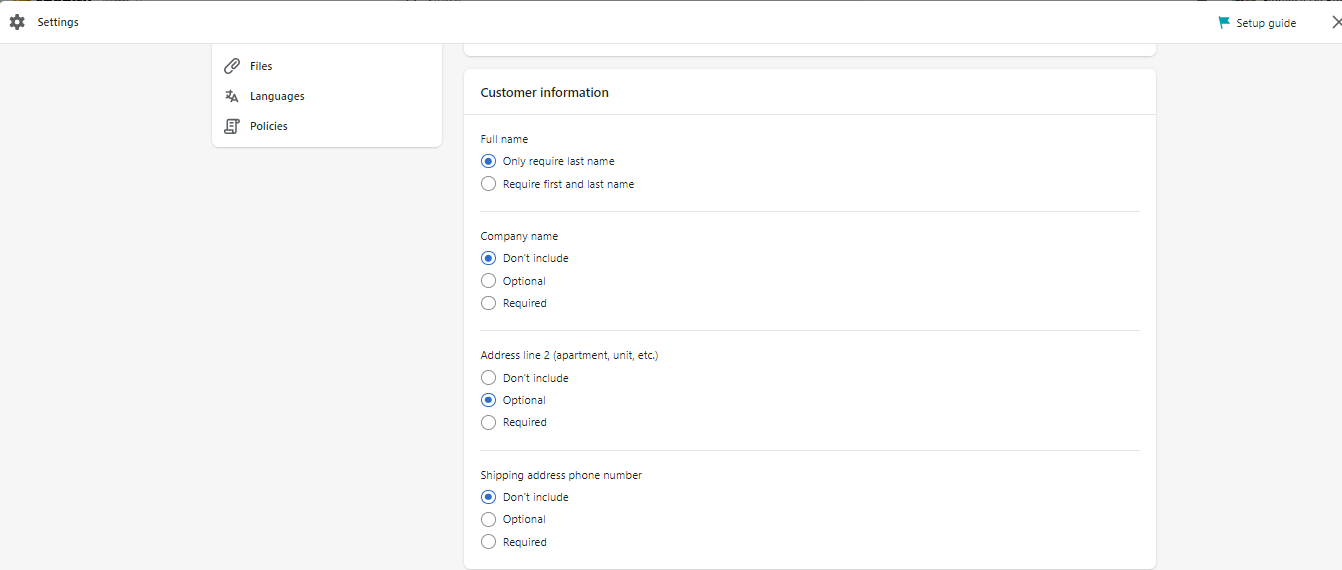
Under Full Name, you can opt to allow your customers to enter their last name only or their first and last names. If you don’t cater to companies, set the Company Name to Don’t Include. Under Address line 2, you can opt to make it Optional.
If you cater to these countries, you should choose Don’t Include under Address line 2 because your customers will need to input it twice if you don’t. The countries include Argentina, Belgium, Chile, Austria, Brazil, China, Czech Republic, Estonia, Colombia, Denmark, Finland, Germany, Hungary, France, Hong Kong SAR, Israel, Japan, Malaysia, Italy, Latvia, Mexico, New Zealand, Poland, Netherlands, Norway, Portugal, Russia, South Africa, Romania, Singapore, Spain, Switzerland, United Arab Emirates, Sweden, Turkey, and the United Kingdom.
- Shopify doesn’t maintain customer contact and shipping address information. If the buyer ticks on “Save this information for next time” during checkout, their browser will save it for them. It’s their browser that automatically fills in the contact and address information. However, Shopify triggers the clearing of the cached information in customer browsers after a year.
Conclusion
Congratulations! Your repeat customers will be happy not to be inconvenienced in entering details they’ve provided in their previous orders.
Execution Checklist:
-
Shopify doesn’t collect customer information.
-
However, if the customer ticks on “Save this information for next time” during checkout, their browser will save the details for them.
-
Shopify triggers the deletion of the cached information in the customer’s browser after a year.
-
As a store owner, you can only set to optional, required, or don’t include fields like full name, company name, address line 2, and shipping address phone number