Identify & Fix Content Cannibalization Issues in Shopify
This process aims to identify and fix content cannibalization issues in Shopify which cause confusion for search engines and ultimately result in lower search rankings and traffic…
Prefer a shortcut? 16 free tools do parts of this for you.

Aim: This process aims to identify and fix content cannibalization issues in Shopify which cause confusion for search engines and ultimately result in lower search rankings and traffic for the affected pages.
Optimal Outcome: The main outcome of this process is to avoid and fix content cannibalization issues on Shopify which results to maximizing the effectiveness of content marketing efforts and avoiding the negative consequences of content cannibalization.
What do you need to start: You must have a Shopify account to start this process.
Why is this SOP Important: Fixing content cannibalization is crucial for maximizing the effectiveness of content marketing efforts, improving search engine rankings and traffic, and enhancing the user experience on a Shopify website.
When and Where to execute: Fixing cannibalization should be done as soon as it is detected or as soon as it starts to negatively impact a business.
Who Should Be Doing This: The responsibility for fixing content cannibalization may fall on different individuals or teams, depending on the root cause of the problem.
If the issue is related to site structure, then the responsibility may fall on web developers or site architects to reorganize the site's hierarchy, ensure that each page has a unique URL, and implement proper redirects where necessary.
If the issue is related to keyword targeting, then the responsibility may fall on SEO specialists to conduct keyword research and develop a strategy that ensures each page targets unique keywords and topics.
If the issue is related to content duplication, then the responsibility may fall on content creators or editors to identify duplicate content and either remove or consolidate it, as well as ensure that new content is original and not inadvertently duplicating existing content.
What is Content Cannibalization?
Content cannibalization is a situation where multiple pages on a website target the same keyword or topic, causing them to compete in search engine rankings. This can lead to a drop in traffic, as search engines may struggle to determine which page is the most relevant for a particular query.
Content cannibalization can occur when a website has multiple pages that are very similar in terms of content, structure, or targeting, or when a website has a poor site structure that makes it difficult for search engines to understand the hierarchy of the pages.
Content cannibalization can negatively impact a website's search engine optimization (SEO) efforts, as it can dilute the authority and relevance of the site's pages. To prevent content cannibalization, it is important to have a clear content strategy and site structure that ensures each page targets unique keywords and topics, and that there is a clear hierarchy of content on the site.
Execution
Keyword Cannibalization
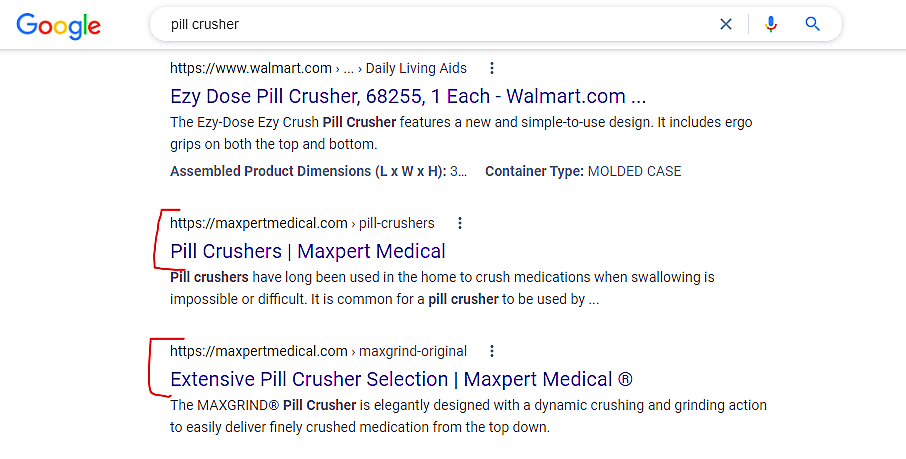
Maxpert Medical has two listings on the first page of Google's search results for the term "Pill Crusher," if you conduct a Google search for it (see screenshot below). They now hold the #7 and #8 spots on Google's search results page, respectively.
Many pages on Maxpert's website use the same or related terms, as an example. Google cannot decide which website to prioritize, thus both are included, although at a lower position.
As a result of rating two sites, Maxpert receives less hits in the #7 and #8 spots than they would have if they had only one powerful page in the #2 or #3 spot. You will learn how to resolve and enhance a problem like this, so don't worry.
The same kind of product is featured on two different product sites, one for men and one for women. For instance, I discovered that Page 1 and Page 2 of Google results for the term "Patriotic t-shirt" were for the same store.

Detecting Keyword Cannibalization
- Site Research
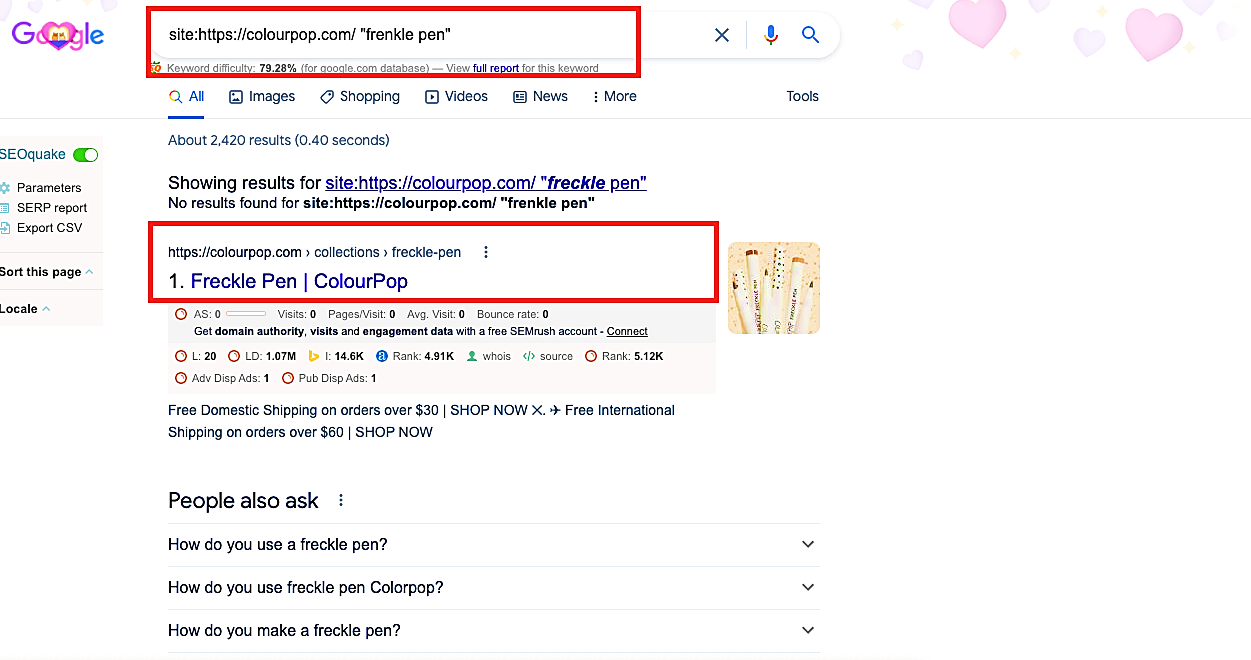
We discovered that two Sites from Moz are ranking for the term "Frenkle Pen" after conducting a site search on Google. Other product pages were ranked below the collection page, which was positioned in first place.
- Ahref’s Keyword Research
-
Identify the pages on your website that are ranking for the same or similar keywords.
-
In Ahrefs, go to the "Site Explorer" tool and enter the URL of one of the pages you want to check.
-
Click on the "Organic Keywords" section to see the list of keywords that this page is ranking for.
-
Export the list of keywords to a CSV file.
-
Repeat steps 2-4 for all the pages you want to check.
-
Combine all the CSV files into a single spreadsheet and remove any duplicates.
-
Sort the spreadsheet by the "Search Volume" column to identify the keywords with the highest search volume.
-
Look for instances where multiple pages on your website are ranking for the same keyword. This is a sign of content cannibalization.
-
Once you have identified the instances of content cannibalization, decide which page is the most important for that keyword and make sure it is optimized for that keyword.
-
Consider consolidating the other pages by redirecting them to the most important page or by merging the content from the other pages into the most important page. This will help to avoid diluting your search engine rankings and improve the overall user experience.
- SEMRush
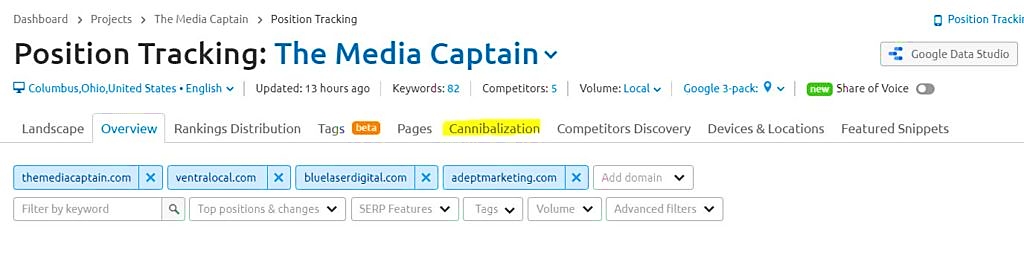
It is a good thing that there are excellent tools available to assist you spot keyword cannibalization. SEMrush offers a tool that can examine every page on your website and find instances when different sites are showing up for the same term.
- You enter your position tracking and choose "Cannibalization,” as shown below. This will provide you with the information you need to make informed decisions about how to improve cannibalization on your site.
- SEMRush will then provide the number of impacted keywords and cannibalized pages in your account.
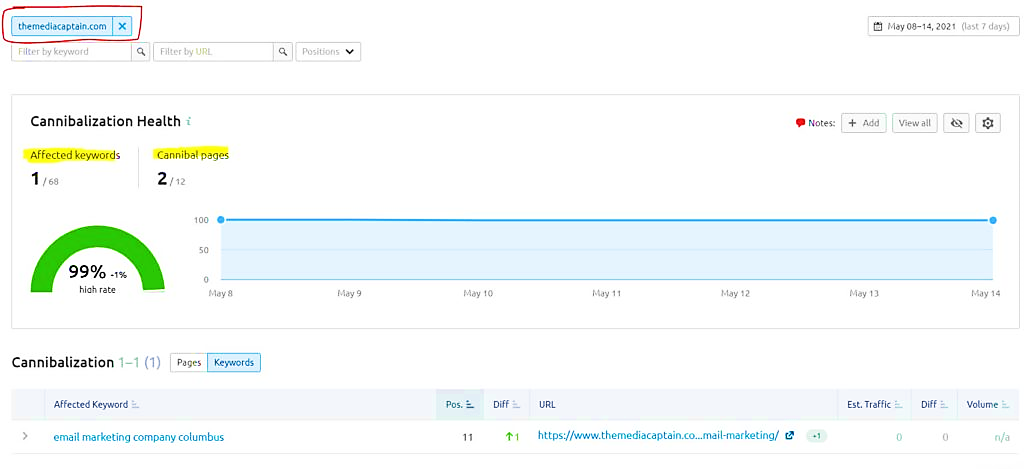
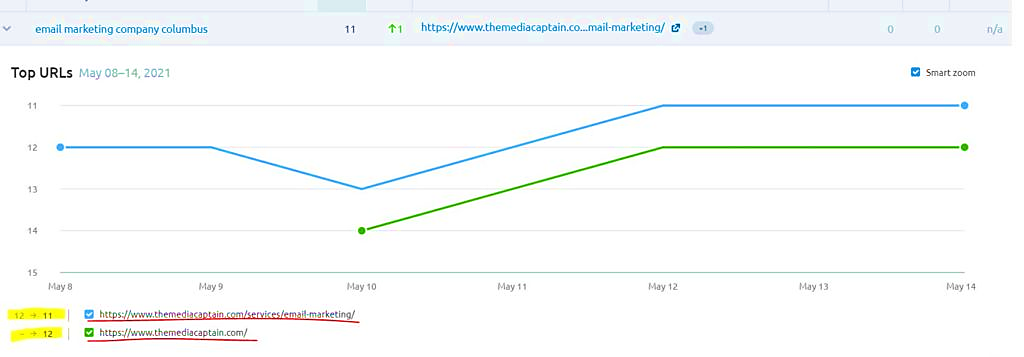
- To find out which two pages on your site are attempting to rank for the impacted term, you should expand it. In this case, Google is showing the phrase "Email Marketing Business Columbus" at places #11 and #12. For this term, Google is undecided on whether to rank the main page or the service-specific page. This is the ideal illustration of cannibalization. Google is placing both pages lower in the search results than the top five spots on a single page.
Fixing Content Cannibalization Issues
Method 1. Let it be.
There is no need to delete any of your pages if they are all among the top 10 SERPs and receive a lot of traffic. Unless your pages don't serve your company at all, this is a fairly uncommon approach.
Method 2. Internal Linking
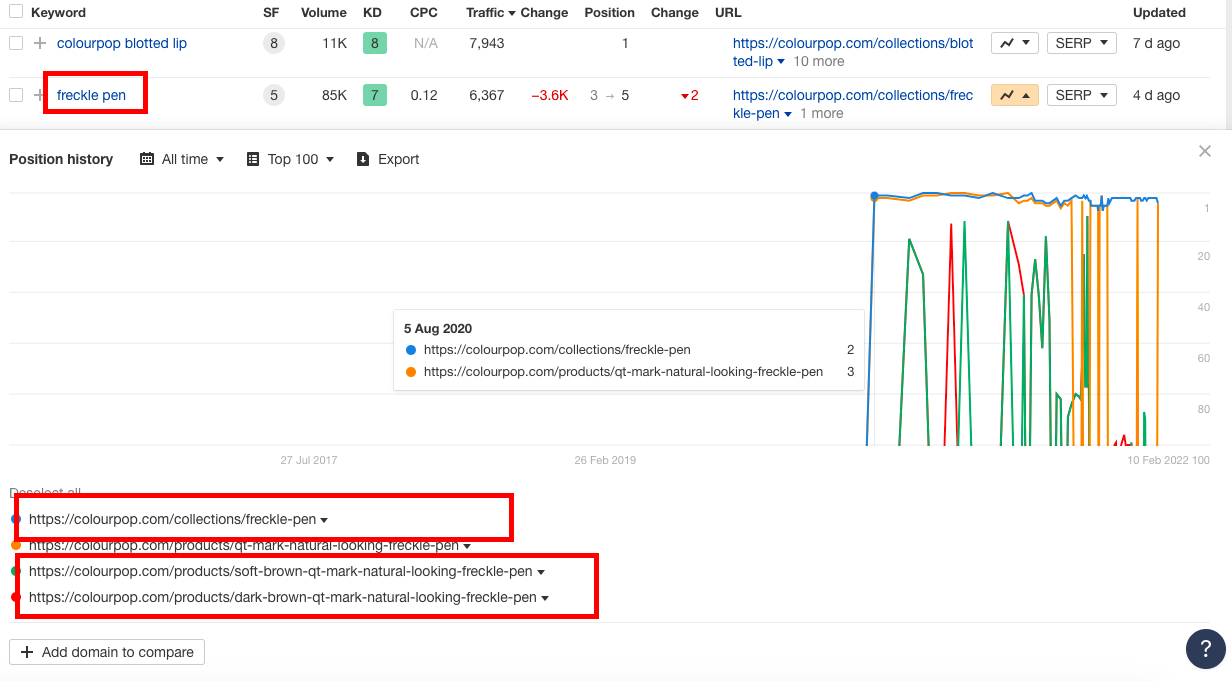
Another way to rearrange your site design and inform Google about the importance of your pages is through internal linking. For instance, link a blog post with the keyword "frenkle pen" ranking to a collection page with the same keyword ranking.
Internal linking works by creating a network of pages within your website, with each page linking to other relevant pages on your site. This helps search engines understand the structure of your website and the relationships between different pages.
Method 3. 301 Redirect
Another method is to reroute one page (with existing traffic, like a blog page) to another page you want to rank (like a collection page), increasing traffic to the ranking page in the near term. Just be sure to reindex the page in Google.
Conclusion
You’re done! Always remember that checking and fixing content cannibalization is an important SEO strategy that can help to improve your website's search engine rankings and user experience.
Content cannibalization occurs when multiple pages on your website target the same or similar keywords, causing them to compete against each other for search engine rankings. This can result in a dilution of your website's authority and can make it harder for users to find the information they are looking for.
Here are a few reasons why it is important to check and fix content cannibalization:
-
Avoid keyword competition: When multiple pages on your website target the same keyword, they can end up competing against each other for search engine rankings. This can result in lower rankings for all the pages, reducing your website's visibility and traffic.
-
Improve user experience: Content cannibalization can make it harder for users to find the information they are looking for on your website. By consolidating and optimizing your content, you can create a more streamlined user experience and reduce the bounce rate of your pages.
-
Increase page authority: When multiple pages on your website target the same keyword, they can dilute the authority of your website. By consolidating your content and linking to the most authoritative page, you can increase the page authority of that page and improve its search engine rankings.