Effective Strategies for Generating Reviews on Google
To share some of the most effective strategies for generating reviews on Google.
Prefer a shortcut? 16 free tools do parts of this for you.

Aim: To share some of the most effective strategies for generating reviews on Google.
Optimal Outcome: To strengthen your brand and boost your business’ credibility. Reviews accumulated from Google allows you to find new customers which lead to more purchases and sales for your business.
What do you need to start: To follow this SOP, you need to have a verified account on Google Business Profile (for Google Maps and Search), as well as social media platforms and an online store website where you can share your Google review link.
Why is this SOP Important: It is important to strategize the process to accumulate Google reviews for your business and give the customers to describe and possibly illustrate the quality of your products and services because it may serve as a great advertising tool to encourage other customers to try them. Another advantage about Google reviews is that it affects the search engine ranking for businesses who have a positive inclination of reviews.
When and Where to execute: This task is usually done when you are a starting business in a completely competitive field and you want an organic way to promote your products and services to the public. In addition to this, reviews on Google are helpful to improve your products or services and be consistent in the long run.
Who Should Be Doing This: This should be done by the person/s assigned to the Marketing or Customer Service department in your company.
Google Review Generation
Google reviews provide useful input to businesses without requiring the customers of a Google account to leave a review. Aside from helping to advertise your business, Google reviews also allows you to interact with your customers which also leads to customer retention because it shows that you care about the opinions of your customers. Increasing the visibility of your business enables you to induce more sales which would be beneficial to the success of your business.
Execution
Resources/Tools & Set up
-
Google Business Profile
-
Business Social Media Platforms
-
Online Store Website
Effective Strategies for Generating Reviews
- Review and follow Google’s policy for posting your business.
To reduce the chance of people being deceived by bogus businesses on Google Maps and Search, Google does not tolerate reviews, photographs, or videos that are unrelated to the location or business where they are tagged. Any content that is discovered to be incorrectly displayed in the Maps will be disallowed and removed from the application's interface.
Due to the fact that Google represents countless businesses nationwide, it is important for companies to be aware of its review procedure in order to avoid penalties. Businesses and customers utilizing the platform must comply with the guidelines provided under the Google Reviews Policy. This guarantees that the system functions effectively for everyone to create a reliable space where users may openly express their opinions while safeguarding businesses from fraudulent reviews, unwanted content, and other unethical business activities.
- List your business on Google Maps.
To list your business on Google Maps, you need to make a Google Business Profile and verify it. To do this, follow these steps:
-
Go to Google Business Profile to get your business listed on Google.
-
Enter your business name to proceed with the process.
-
Choose your business type: Online retail, Local store, or Service business.
-
Then, you can add your business category or the industry that your business is included in.
-
Next is to enter your business address. This is important because pinning your store will depend on the location of your business that you will indicate here.
-
According to the location that you have indicated in your business address, you can now pin your exact location in Google Maps. Take note that Google will still have to check this, so your store will only be visible after the verification process.
-
Next would be the contact details that you would want to share to your customers that would view your business from Google. To assist new customers in finding your place, you can indicate your business contacts, such as phone number and website link.
-
You can verify your store by either entering the code sent to your mailing address or provide Google with a video showing your store.
-
After passing verification, add your services and business hours.
- Provide a customized Google review link.
To create a short and precise link for your Google reviews,
-
Go to the Google Maps Platform.
-
Scroll down to Map actions and under Parameters.
-
Look for the linked text of place ID and click it.
-
After being navigated to the Place IDs page, scroll down to find the ID of a particular page.
-
Click the search bar and search for the name of your business that you have listed on Google Maps.
-
Click the name of your business store and it should show the place ID, then you will copy and paste it on bitly Google Review Link Generator.
-
After shortening and simplifying the link, test it, then it should be ready for dissemination.
- Ask customers for a review.
If you have a physical or online store, it is necessary that you still ask customers for a review. For physical stores, you can personally encourage store visitors to leave a review on your Google review by printing a QR code of your Google review link near the counter or the store’s door. On the other hand, online store business owners may disseminate an email automating tool to send multiple review invitations at once. You can also encourage the people to visit your website because it is easy to navigate in an online platform. If possible, add a personal touch and explain the importance of their review to the business that you have established. It is also crucial to give gratitude to the people who have added reviews on your Google business store so that they can commend the service that they have experienced from your business.
- Add a Google review button on your website.
Every business in any industry requires a website to establish an online presence and increase your business’ credibility. It is important to gain your customers’ trust because they will not buy from a website that they think is not a legitimate business. In adding a Google review button, it must be big enough to be noticeable but small enough to avoid taking the spot away from your products. To do this, you can collaborate with your web designer and embed the Google review link to that button. By doing this, you allow every website visitor to write reviews on their satisfactory rating from the products or services that they have received.
- Respond to your customers’ reviews appropriately.
To build trust between your business and your customers, responding to your customers’ professionally will allow them to confide in your service and induce loyalty to the brand. Additionally, addressing negative reviews on your website proves that you have the willingness to improve your products or services. Lastly, it is a great way of showing gratitude to your customers who share their suggestions on the reviews without harming your business. Commitment to customers is shown when you respond to them, and this is often appreciated by both existing and potential customers.
- Share your Google review link on all your social media accounts.
Social media platforms such as Facebook, Instagram, and Twitter are all crucial to generate more reviews on your Google review. As it increases the chance to be seen more in people’s feed, sharing your Google review link in these online platforms allows you to see a broader perspective for your business. By creating a post on these websites, you can easily encourage your customers to leave a review and higher online visibility means higher chances of search engine rankings on Google.
- Include Google reviews from past clients to your website.
To increase the credibility of your business, you need to include the Google reviews from your past clients in your website. Displaying these reviews persuades new customers who order from your shop to leave a review as well. If you have improved a lot of things about a product, it will show the progress and the difference that your business has made in the duration of your business which will count as your business’ social proof to urge potential customers to give a chance to your products/services.
- Add your Google review link in your email signature.
To add a Google review link in your Email signature, follow these steps:
-
Go to Google Mail Settings.
-
Under General, look for the Signature section.
-
Click “Create new” and type in “Leave a review here.” or anything that indicates leaving a review.
-
A rich text editor will show after this. Click the Link button.
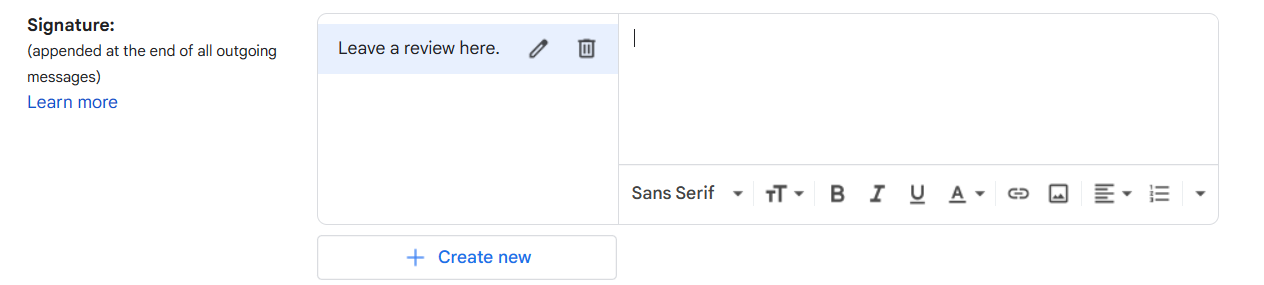
- After clicking the Link button, edit the Text to display to “Google Reviews” and enter the URL link of your customized Google review link that you had created in the third bullet (Provide a customized Google review link.).
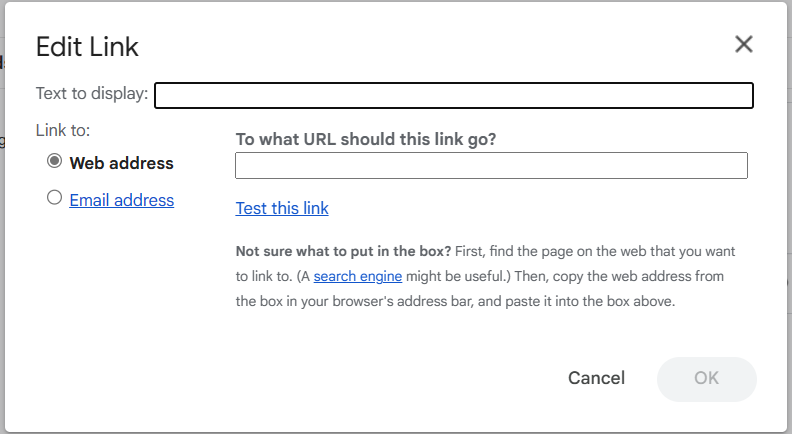
- After clicking “OK”, every Email will now be sent with the signature indicating your Google review link.
- Create a QR code for your Google review link.
Creating a QR code is an easy step to disseminate your Google reviews on your physical stores. To create one, follow the steps below:
-
Go to qr-code-generator.com.
-
Enter your customized Google review link in the space provided.
-
You can see the finished QR code on the right side.
-
Edit it out with frames, shape, color, or you can customize it by adding your logo.
-
Click “Download” in JPG format.
Generating a QR code allows you to display your Google review link on marketing posters so that your customers can leave a review by scanning them because it is easier to scan the QR code using the built-in QR scanner from their devices.
Conclusion
You’re done! Always remember that Google reviews from your customers can help in establishing your brand's recognition and will likely lead to increasing your sales and attract more customers to try your items. In addition to this, customer feedback also significantly impacts the improvement of your products or services.
-
There are several strategies to encourage your customers to leave a review on your product that they have purchased, but it must also be emphasized that your product must be able to meet their standards.
-
In Google reviews, people can leave negative reviews on your business if they did not like it. These negative reviews will also downwardly affect those customers who want to try your products.
-
If you are confident with your items, you can disseminate your Google review link in numerous online platforms to gather more reviews. You can also add it in your website, as it is the first thing that consumers look into when they want to purchase a product.
-
Make it easy for your customers to leave a review, such as make a shortened link for the review link, create a QR code, or make a Google review button for them. Additional steps in reviewing might discourage them from leaving reviews.