Use subheadings (H2-H6) for content hierarchy
This process aims to use subheading (H2-H6) appropriately for content hierarchy depending on the specific content you want to create.
Prefer a shortcut? 16 free tools do parts of this for you.

Aim: This process aims to use subheading (H2-H6) appropriately for content hierarchy depending on the specific content you want to create.
Optimal Outcome: The major output of this process is appropriate usage of subheading (H2-H6) that can improve the user experience, make your content more discoverable in search engines, and help you communicate your message more effectively.
What do you need to start: You must have a Shopify account to start this procedure.
Why is this SOP Important: Subheadings (H2-H6) are important for content hierarchy in Shopify because it helps to organize and structure content. Subheadings provide a clear and logical structure to your content, making it easier for users to understand and navigate.
When and Where to execute: The frequency of subheadings (H2-H6) in content hierarchy in Shopify will depend on the length and complexity of your content. Generally, it's a good idea to use subheadings frequently enough to break up your content into logical sections but not so frequently that they become distracting or overwhelming.
Who Should Be Doing This: The content creator, such as a copywriter or content strategist, may be responsible for creating the subheadings. In other cases, a web developer or designer may be responsible for formatting and implementing the subheadings in the Shopify platform.
What are subheadings (H2-H6)?
Subheadings (H2-H6) for content hierarchy refer to the use of HTML tags to organize and structure content on a webpage. In HTML, headings are marked up with H1, H2, H3, H4, H5, or H6 tags, which represent the level of importance and hierarchy of the content.
The H1 tag is typically reserved for the main heading of the page, while H2-H6 tags are used for subheadings and sections within the content. Using subheadings helps to break up the content into smaller, more digestible sections, making it easier for users to scan and understand.
Subheadings (H2-H6) for content hierarchy are important for several reasons, including improving readability, aiding in scannability, and enhancing search engine optimization (SEO). By using descriptive and relevant subheadings, you can help search engines understand the structure and content of your page, which can improve its relevance and visibility in search results. Subheadings also make it easier for users to quickly find the information they need, which can increase engagement and time on site.
Execution
Add Subheading to Product Page
-
Log in to Shopify account.
-
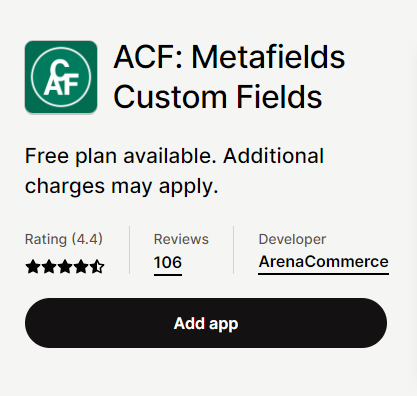
Install "Advanced Custom Fields" from the app store.
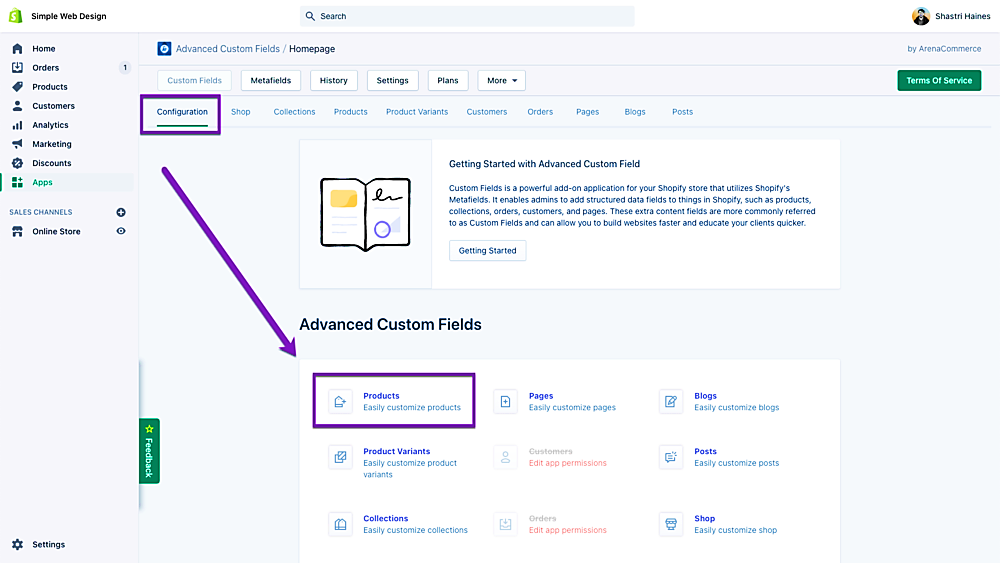
- Accept the privacy statement, then click "Products" on the Configuration panel.
- Drag the HTML block into the area labeled "Product Fields."
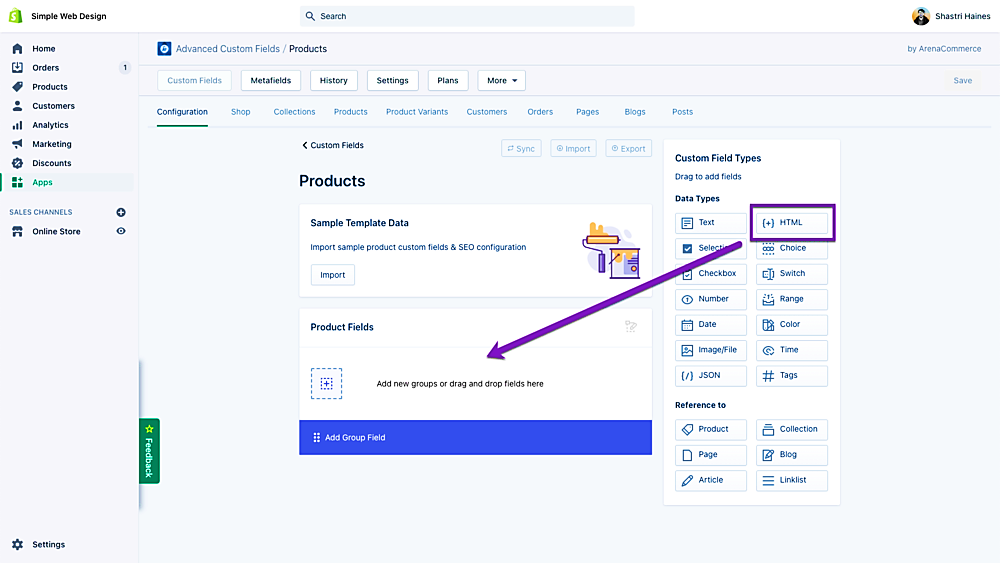
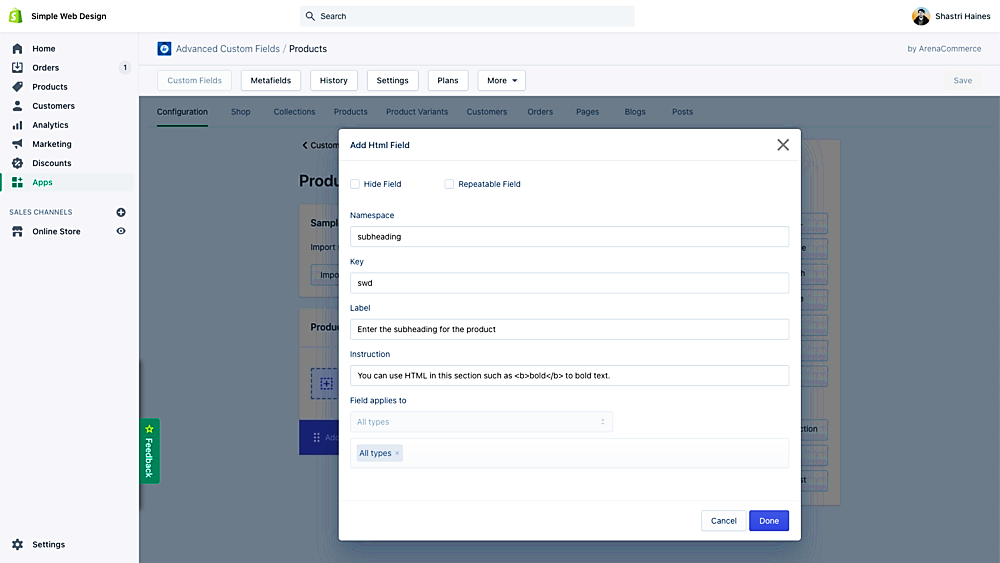
- You will then see a pop-up. Fill out the fields in the pop-up as shown below.
-
Namespace: subheading
-
Key: swd
-
Label: Enter the subheading for the product
-
Instructions: You can use HTML in this section such as <b>bold</b> to bold text.
- Click Done and then Save.
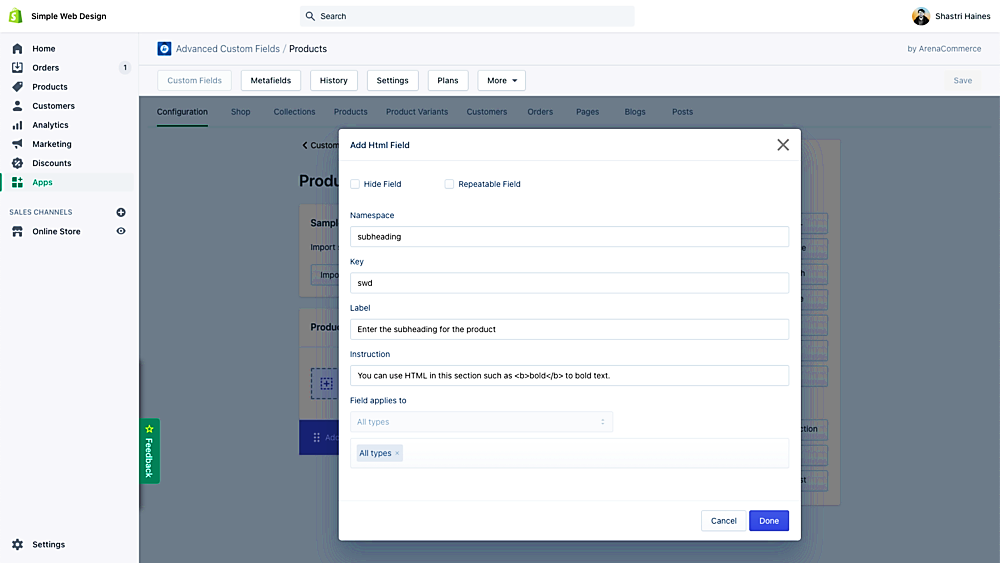
Add subheading to your product
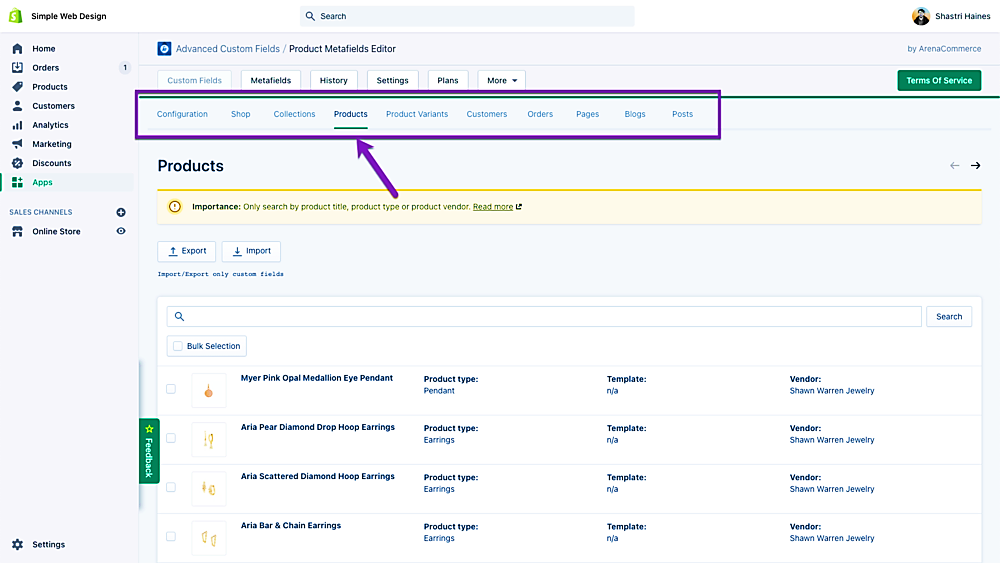
- Click on "Products" in the top menu of the app, then select one of your items.
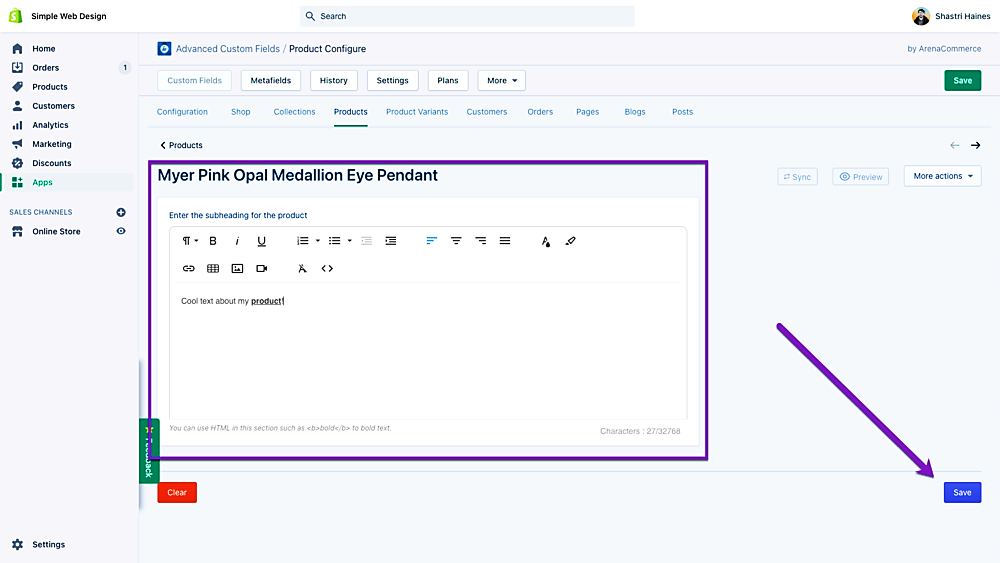
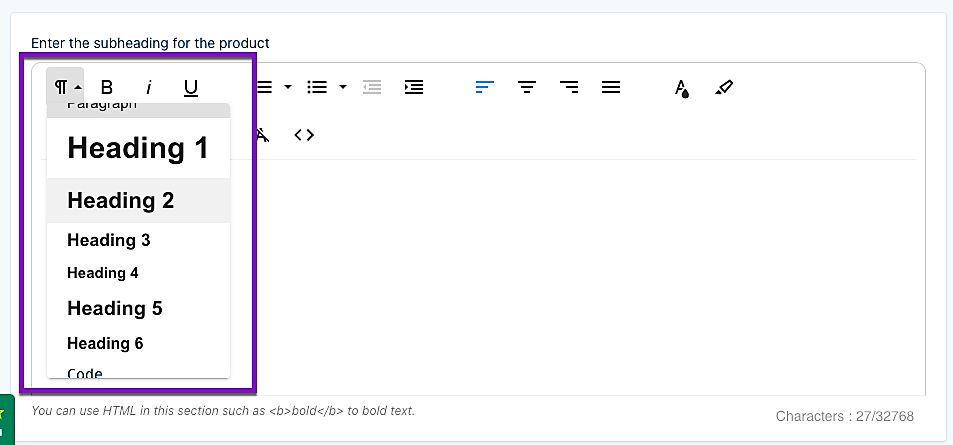
- Enter your text and use the built-in toolbar to format it. Click "Save." The metafield data has now been successfully added to your product.
How to Make the Subheading Show Up on the Product Page
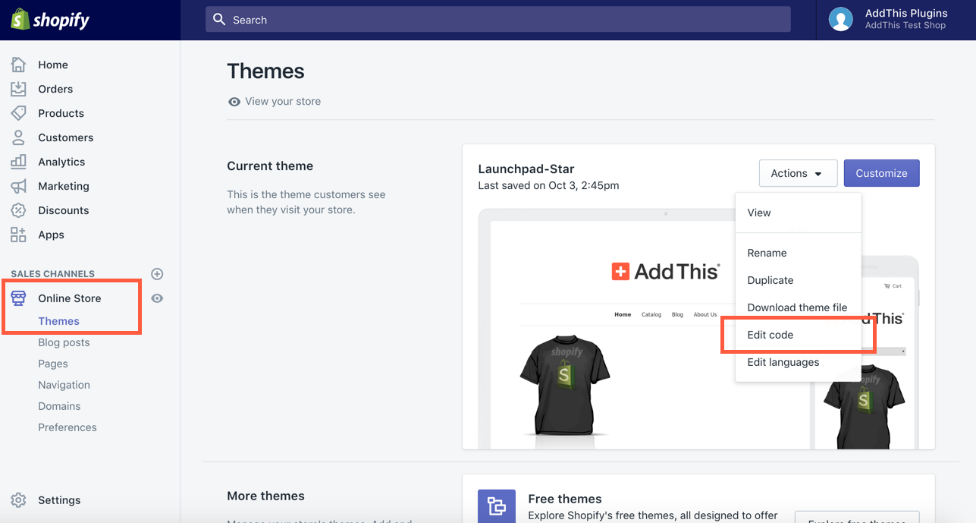
- Navigate to your Shopify admin panel. Click Online Store > Themes.
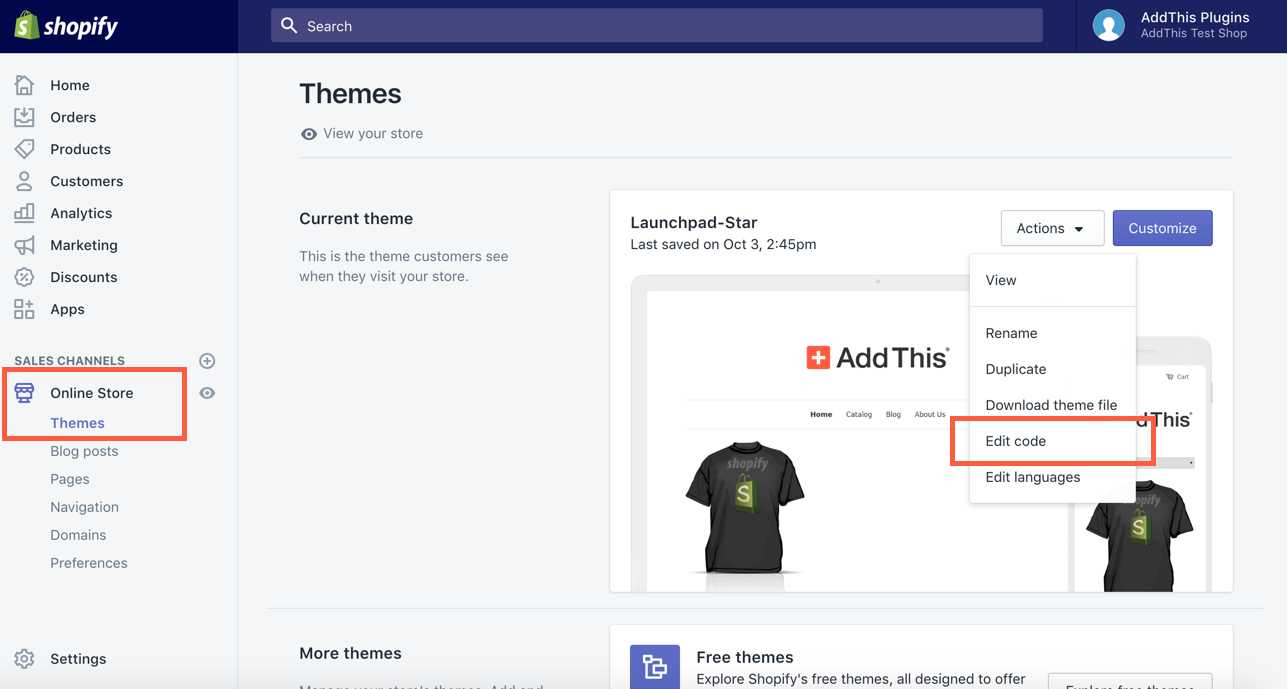
- Click Actions > Edit Code.
- Search for ‘product-template’.
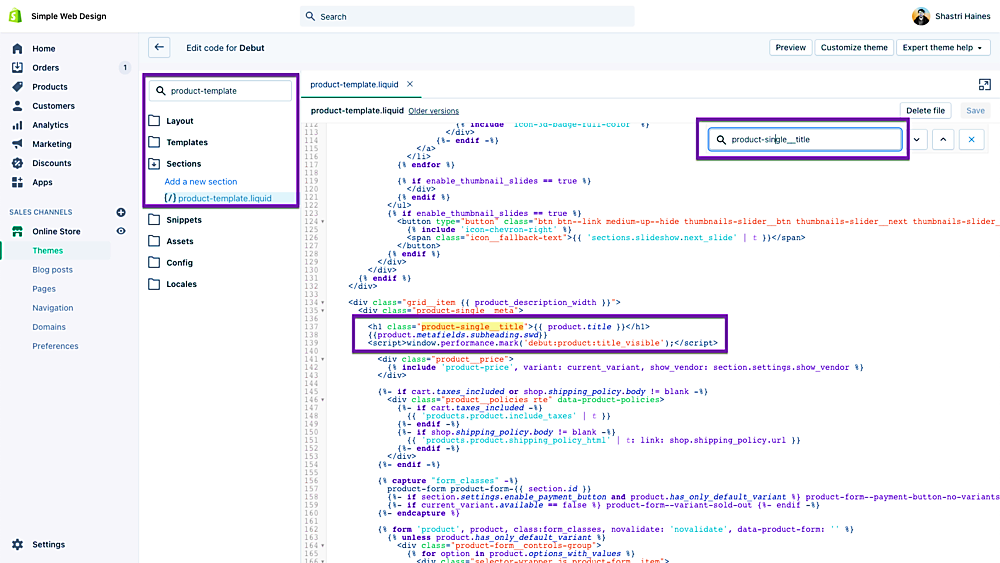
- Click into that file and search for ‘product-single__title’. You should see the line:
<h1>{{ product.title }}</h1>
Press Enter/Return to start a new line after the </h1> and add the below code:
{{product.metafields.subheading.swd}}
Click Save.
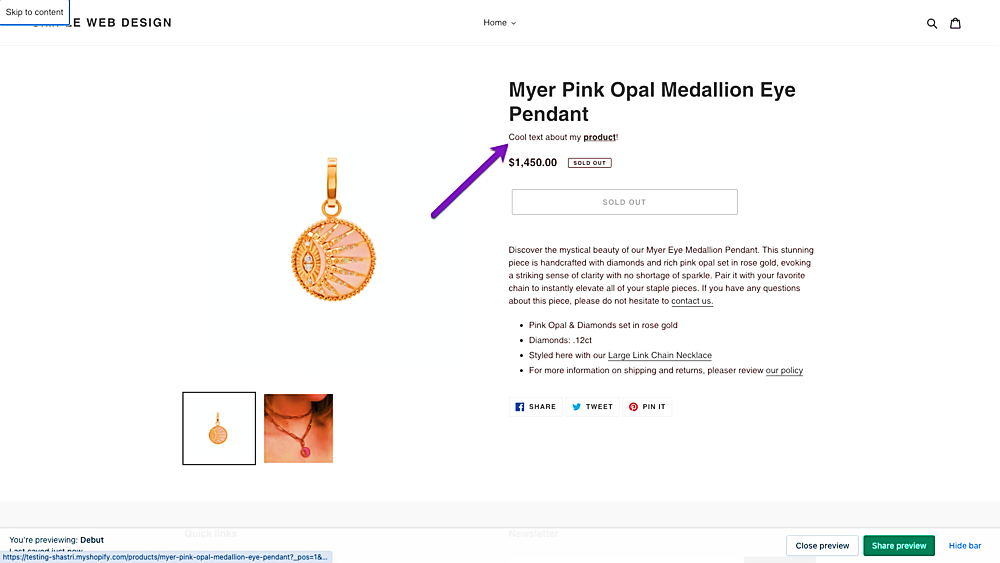
- Visit your product page, where you can view the text that appears beneath your title.
- You may convert the text to a header using the editor in the metafields app. By default, a paragraph tag is used. As an alternative, you may add the following code to your previously inserted code to ensure that all subheadings use the H2-H6 tag:
<h2>{{product.metafields.subheading.swd}}</h2>
<h3>{{product.metafields.subheading.swd}}</h3>
<h4>{{product.metafields.subheading.swd}}</h4>
<h5>{{product.metafields.subheading.swd}}</h5>
<h6>{{product.metafields.subheading.swd}}</h6>
Conclusion
You’re done! Always remember that the frequency of subheadings (H2-H6) in the content hierarchy in Shopify will depend on the length and complexity of your content. Generally, it's a good idea to use subheadings frequently enough to break up your content into logical sections but not so frequently that they become distracting or overwhelming. Here are some general guidelines for using subheadings in Shopify content:
-
Use H2 headings sparingly: Reserve H2 headings for major sections of your content, such as product descriptions, collection descriptions, and page titles.
-
Use H3 headings more frequently: Use H3 headings to break up your content into smaller sections within major sections.
-
Use H4-H6 headings as needed: Use H4-H6 headings to create further subheadings within H3 headings.
-
Use consistent formatting: Use a consistent formatting style for your headings, such as font size, color, and weight, to ensure a cohesive look and feel throughout your site.