Title Tag and Meta Description Tag in Shopify Theme
This process aims to create a title tag and meta description tag in the Shopify theme that establish and reinforce a brand's message, tone, and voice in search results.
Prefer a shortcut? 16 free tools do parts of this for you.

Aim: This process aims to create a title tag and meta description tag in the Shopify theme that establish and reinforce a brand's message, tone, and voice in search results.
Optimal Outcome: The main outcome of this process is to boost on-page SEO and help search engines understand what the page is about and how it should be ranked in search results.
What do you need to start: You must have a Shopify account to start this process.
Why is this SOP Important: Having a good meta tag and title tag can improve a website's visibility in search results, increase click-through rates, reinforce branding, and improve the user experience. The creation and execution of meta tags and title tags should be a key component of any website development project to help improve search engine visibility and drive traffic to the website.
When and Where to execute: Meta tags and title tags should be created and executed during the website development process, as they are an essential part of on-page search engine optimization (SEO).
Who Should Be Doing This: The responsibility of creating a title and meta tag typically falls under the purview of the website developer or the SEO specialist.
What is Title Tag and Meta Description Tag?
Title Tag and Meta Description Tag are two important elements of the HTML code used to optimize a website for search engines.
The title tag is a piece of HTML code that specifies the title of a web page. It appears in the top bar of the browser window and is used as the clickable headline in search engine results. The title tag should be descriptive, accurate, and contain relevant keywords to help search engines and users understand what the page is about.
The meta description tag is a summary of the content on a web page. It appears beneath the title tag in search engine results and provides additional information to users about what they can expect to find on the page. Like the title tag, the meta description tag should be descriptive, accurate, and contain relevant keywords to help search engines and users understand what the page is about.
The meta tag and title tag are added to the HTML code of each webpage. The title tag is typically placed within the <head> section of the HTML code, and the meta description tag is also placed within the <head> section of the code.
Execution
How to add Meta Title and Meta Description in Shopify
-
Log in to your Shopify Account.
-
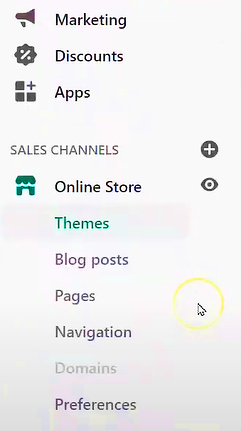
Navigate to your Shopify Admin Panel and click Online Store > Preferences.
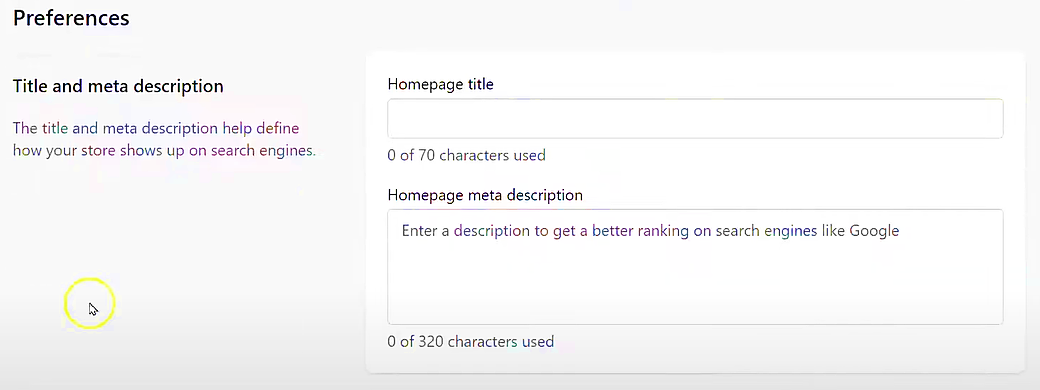
- You will notice the Title and Meta description in the Preferences dashboard.
When creating the meta tag and title tag, it's important to keep the following best practices in mind:
-
Determine the primary keyword or keyphrase for the page: Start by identifying the primary keyword or keyphrase that the page is targeting. This keyword should be relevant to the content on the page and should be something that users might search for when looking for information related to the page.
-
Craft the title tag: The title tag should be no more than 60 characters and should include the primary keyword or keyphrase. It should accurately reflect the content on the page and be compelling enough to encourage users to click on the link.
-
Write the meta tag description: The meta tag description should be no more than 160 characters and should provide a summary of the content on the page. It should include the primary keyword or keyphrase and be written in a way that is engaging and informative to users.
-
Determine the primary keyword or keyphrase for the page: Start by identifying the primary keyword or keyphrase that the page is targeting. This keyword should be relevant to the content on the page and should be something that users might search for when looking for information related to the page.
-
Craft the title tag: The title tag should be no more than 60 characters and should include the primary keyword or keyphrase. It should accurately reflect the content on the page and be compelling enough to encourage users to click on the link.
-
Write the meta tag description: The meta tag description should be no more than 160 characters and should provide a summary of the content on the page. It should include the primary keyword or keyphrase and be written in a way that is engaging and informative to users.
It is important to note that meta tags and title tags should be unique for each page on a website. This helps search engines understand the content of each page and rank it accordingly in search results.
Sample:
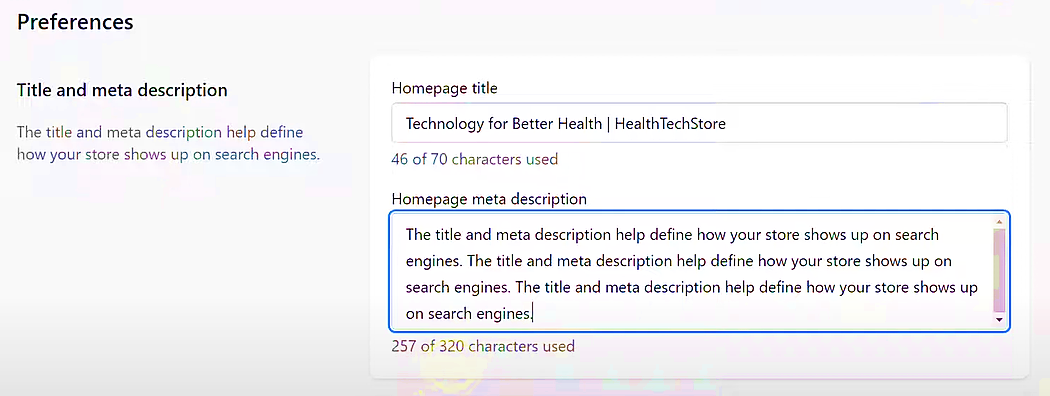
- Click Save.

- Congratulations! You have successfully created a Title Tag and Meta Description Tag.
Inspecting Title Tag and Meta Description Tag
- Navigate to your Shopify website.

- Right-click and go to Inspect.

- Your title tag and meta description tag should be readily visible in the elements.


- Congratulations. You have successfully created a title tag and meta description tag in Shopify.
Conclusion
You’re done! Always remember that creating a title tag and meta tag description requires careful attention to keyword usage, relevancy, and clarity, and having a good meta tag and title tag is important for several reasons:
-
SEO: The meta tag and title tag are important elements of on-page SEO. They provide information to search engines about the content of the page and help search engines understand how to categorize and rank the page in search results. Including relevant keywords in the title tag and meta description tag can also help improve the page's visibility in search results.
-
Click-through rate: The meta tag and title tag appear in search engine results, and can impact whether users click on a particular link or not. A well-crafted and compelling title and description can increase the likelihood of users clicking on the link and visiting the website.
-
Branding: The meta tag and title tag can help establish and reinforce a brand's message, tone, and voice in search results. Consistent use of branding elements in these tags can help users recognize and remember a brand more easily.
-
User experience: The meta tag and title tag can provide users with a quick and informative summary of what to expect from the page. This can help improve the user experience by setting expectations and reducing the likelihood of users clicking on irrelevant or misleading links.
Execution Checklist:
By following these steps, you can create effective title tags and meta descriptions that improve your website's visibility and ranking in search results.
-
Keep it concise: The title tag should be no more than 60 characters, and the meta description tag should be no more than 160 characters.
-
Use relevant keywords: Include relevant keywords in the title tag and meta description tag, but avoid keyword stuffing.
-
Make it compelling: Use language that is compelling and engaging to encourage users to click on the link.
-
Be accurate: Make sure the title tag and meta description tag accurately reflect the content on the page.