Safeguard Your Order from Chargeback with Shopify Protect
To provide guidelines on how to safeguard your orders from chargebacks with Shopify Protect.
Prefer a shortcut? 16 free tools do parts of this for you.

Aim: To provide guidelines on how to safeguard your orders from chargebacks with Shopify Protect.
Optimal Outcome: Orders that are eligible for Shopify Protect are protected against chargebacks and fraudulent activities.
What do you need to start: To perform this SOP, you will need a Shopify account
and at least one order for fulfillment.
Why is this SOP Important: Chargebacks can result in significant financial loss and can have a negative impact on your store's reputation. By using Shopify Protect, eligible orders will be protected against chargebacks and fraudulent activities, giving you peace of mind and ensuring that your business is protected.
When and Where to execute: This SOP can be executed at any time after you receive an order on your Shopify store. It is recommended to execute this SOP as soon as possible to protect the order from chargebacks.
Who Should Be Doing This: The person responsible for managing orders and payments on the Shopify store should be executing this SOP.
What is Shopify Protect?
Shopify Protect is a service offered by Shopify that provides chargeback protection from fraud. This service is completely free and helps protect eligible orders against fraudulent and unrecognized chargebacks. Eligible orders include those processed through Shop Pay, including transactions on other platforms like Facebook, Instagram, or Google that use Shop Pay.With Shopify Protect, if an eligible and protected order receives a fraudulent chargeback, the chargeback amount and associated fee are reimbursed to you, and the chargeback process is handled on your behalf. Overall, Shopify Protect is a valuable tool to safeguard your business from fraudulent chargebacks and to give you peace of mind.
Execution
Resources/Tools & Set up
-
Shopify account
-
Oder/s for fulfillment
Determine eligibility of orders
Determining if orders are eligible for Shopify Protect is an important step in protecting your business from chargebacks and fraud. To be eligible for Shopify Protect, orders must meet the following criteria:
-
Shopify Protect is designed to cover orders that require shipping of physical items. Orders containing digital products or those that are picked up in-store are not covered.
-
For an order to qualify for Shopify Protect, all items must be marked as fulfilled and processed through Shop Pay.
-
A Shopify Payments account in the United States is necessary to access the service.
-
Orders must be fulfilled within 7 days of placement and in transit to the customer within 10 days to qualify for protection.
-
Any change to the shipping address after checkout will cancel the Shopify Protect coverage for that order.
-
Orders must have a Shopify Protect status to be eligible for protection.
-
A valid tracking number from a supported carrier is required for protection, and all items in the order must be fulfilled by supported carriers. If any item is fulfilled by an unsupported carrier, the order cannot be protected. The following carriers are supported by Shopify Protect:
-
Shopify Fulfillment Network (SFN)
-
USPS
-
UPS
-
Canada Post
-
DHL Express
-
FedEx
-
TForce Final Mile
-
Lone Star Overnight
-
United Delivery Service
-
CDL Last Mile
-
Lasership
-
GLS
-
Ontrac
Safeguard you orders with Shopify Protect
Shopify Protect is a powerful tool that helps merchants protect their online orders against fraudulent chargebacks. With Shopify Protect, you can safeguard your eligible orders and ensure that you don't lose money due to fraudulent chargebacks. To start protecting you orders, follow these steps:
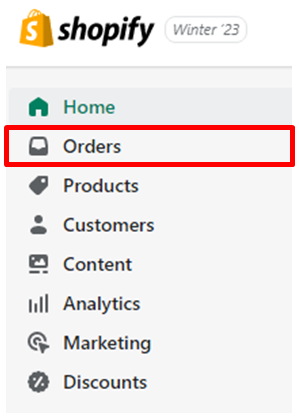
- Go to your Shopify admin and click on Orders.
-
Select the unfulfilled order that you want to protect.
-
Process the order.
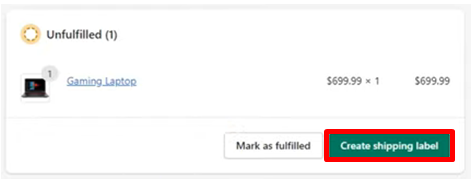
- If you're purchasing a shipping label for your order using Shopify Shipping, you can select "Create shipping label."
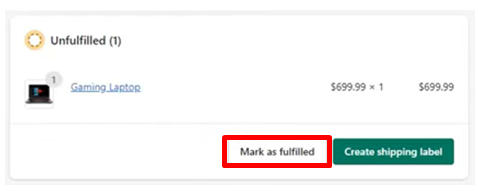
- If you're using a shipping carrier other than Shopify Shipping, you need to click "Mark as fulfilled" and then enter the tracking number from your shipping provider. The tracking URL will be included in the customer's shipping confirmation and update emails. Some services, like SFN or third-party apps, may automatically provide a tracking number for the order page.
- You can choose to send a notification email to your customer immediately after the order is fulfilled by selecting "Send shipment details to your customer now" (this is optional).
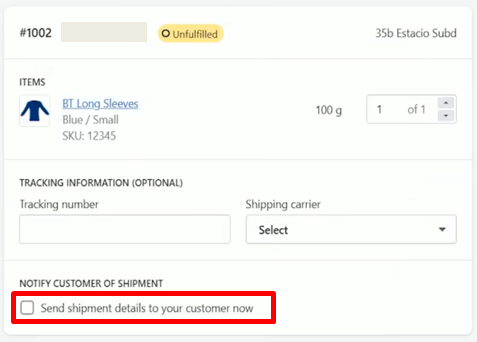
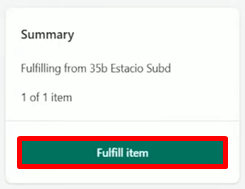
- Once you've added tracking information, you need to click "Fulfill items." If you're using Shopify Shipping, you can select a shipping service and then click "Buy shipping label.”
Conclusion
You’re done! Remember, Shopify Protect is a powerful tool that can help safeguard your orders from chargebacks. By using this feature, you can ensure that you have an extra layer of protection against fraud and other forms of chargebacks. To safeguard your order from chargeback with Shopify Protect, make sure to follow the SOP steps.
Execution Checklist:
-
Activate Shop Pay in your store
-
Fulfill the order within 7 days of being placed
-
Add tracking information to the order
-
Deliver the order to a carrier within 10 days of being placed