Enabling Shop Pay in Shopify for Third-Party Gateways
To enable Shop Pay in Shopify for third-party gateways.
Prefer a shortcut? 16 free tools do parts of this for you.

Aim: To enable Shop Pay in Shopify for third-party gateways.
Optimal Outcome: Successful activation of Shop Pay as a payment option for your customers using third-party payment gateways.
What do you need to start: A Shopify store, access to the Shopify admin dashboard and an active account on a third-party payment gateway that supports Shop Pay.
Why is this SOP Important: Enabling Shop Pay for third-party payment gateways can help business owners provide a seamless and fast checkout experience for their customers, leading to increased customer satisfaction and sales.
When and Where to execute: This SOP can be executed at any time, as long as the business owner has an active account with a third-party payment gateway that supports Shop Pay. It can be executed from anywhere with an internet connection.
Who Should Be Doing This: This task can be assigned to a member of the merchant's team who has access to the Shopify admin dashboard and has the necessary permissions to manage payment settings.
What is Shop Pay?
Shop Pay is a fast and secure checkout process that allows customers to save their email address, shipping and billing addresses, and payment information so they can complete their purchase quickly and easily on Shopify stores. It was created by Shopify to provide a better checkout experience for customers and to help merchants reduce cart abandonment and increase conversion rates. Shop Pay also includes features like order tracking and the ability to cancel or modify an order after it's been placed. Additionally, Shop Pay offers carbon offsetting to help reduce the environmental impact of shipping orders.
Execution
Resources/Tools & Set up
-
A Shopify store
-
Access to the Shopify admin dashboard
-
An active account with a third-party payment gateway that supports Shop Pay
Enabling Shop Pay for Third-Party Gateways
US-based stores have the option to enable Shop Pay by using a third-party payment provider. Enabling Shop Pay through third-party gateways allows you to offer an expedited checkout option for your online store, as well as for Facebook and Instagram platforms.
-
Log in to your Shopify admin dashboard.
-
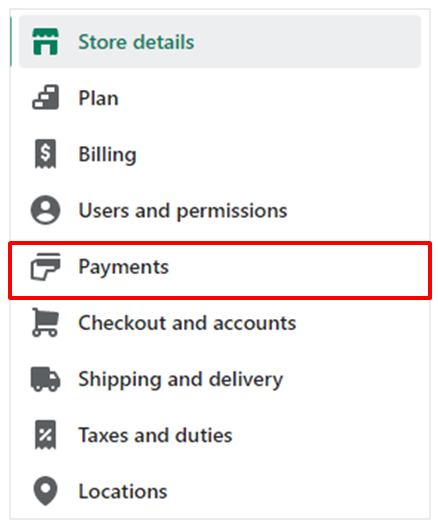
Click on “Settings” and select “Payments”.
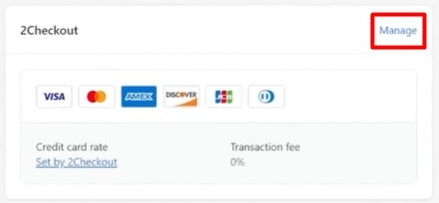
- Go to the payment gateway you want to enable Shop Pay for and click “Manage”.
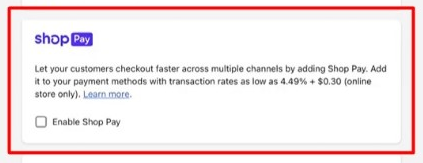
- If the payment gateway supports Shop Pay, you'll see the option to enable it. Check “Enable Shop Pay” turn on Shop Pay for this gateway then click “Save”.
-
Click “Complete set up” in the Shop Pay section and provide the necessary information to connect your payment gateway to Shopify.
-
Click “Save”.
Repeat steps 3-6 for any other third-party payment gateways you want to enable Shop Pay for.
📝Note: In order to receive payouts, it is necessary to complete the setup process for Shop Pay, which involves providing your business details and banking information. If the setup was not completed during the activation of Shop Pay, it must be done within 21 days of the first payment received through Shop Pay. If the setup is not completed within 21 days, all payments will be refunded to the customer automatically.
Benefits of Enabling Shop Pay for Third-Party Gateways
Enabling Shop Pay in Shopify for Third-Party Gateways can provide the following benefits:
-
Faster checkout process: Shop Pay accelerates the checkout process, making it quicker and more convenient for customers to complete their purchases.
-
Increased conversion rates: A faster checkout process can lead to increased conversion rates and fewer abandoned carts.
-
Improved customer experience: Shop Pay stores customer information, making it easier for returning customers to make purchases.
-
Enhanced security: Shop Pay uses advanced fraud detection and protection features to safeguard transactions and protect sensitive customer information.
-
Access to additional sales channels: Enabling Shop Pay for third-party gateways extends the availability of the payment option to additional sales channels, such as Facebook and Instagram.
Conclusion
You’re done! Enabling Shop Pay in Shopify for third-party gateways can significantly enhance your customers' checkout experience and increase your sales. By following the above steps, you can quickly activate Shop Pay for your online store and enjoy its benefits. Don't forget to complete the set-up process and provide all necessary details to start receiving payouts. Here's a quick checklist to ensure a successful execution:
-
Login to your Shopify account
-
Click "Settings," then select "Payments"
-
Select the payment gateway you want to enable Shop Pay for and click "Manage"
-
Check the "Enable Shop Pay" option in the Shop Pay section
-
Complete the set-up process and enter the necessary details
-
Click "Save" to activate Shop Pay for the selected payment gateway